gr-IV-camera.png

frequently asked questions

645z FAQ

The difference between the 645D?
The major difference are the following.
With new image sensor, the image quality has improved, the 645Z equipped the movie and live view function. Also, quick response and operation have been achieved by renewing the entire image processing performance.

The differences of specification are the following.

  Model 645Z 645D
Sensor Effective Pixels 51.4M 40M
Sensitivity 100-204800 200~1000
ISO Expansion Setting × 100~1600
AA Filter × ×
Aspect Ratio 4:3 4:3
Dust Removal ○ ○
Storage Storage Media SDx2 SDx2
Recording Format JPEG/RAW/TIFF JPEG/RAW
Raw Quality Level 14 14
Movie Recording Pixels FullHD/30p, HD/60i ×
4k Interval Recording ○ ×
External Microphone ○ ×
Headphone Terminal × ×
View finder Coverage approx.98% approx.98%
Magnification 0.85x(75mm) 0.85x(75mm)
Eye-Relief Length approx.21mm* approx.21mm*
Diopter Adjustment -3.5~+2.0m-1 -3.5~+2.0m-1
LCD Monitor Size 3.2 3.0
Dots 1037K (3:2) 921K (4:3)
Tiltable LCD ○ ×
Air Gapless LCD ○ ×
Tempered Glass ○ ○
Auto Focus Focus Point(Cross) 27(25) 11(9)
Brightness Range -3~18 1~20
F2.8 luminous flux ○ ×
Exposure Control Type 86K RGB 77-segment
luminosity value -1~21 2~21
Shutter Drive Maximum Shutter Speed 1/4000 1/4000
Continuous Shooting 3fps 1.1fps
Shutter Durability 100K 50K
Sync Speed 1/125 1/125
Interface USB 3.0 2.0
HDMI ○ ○
Cable Switch ○ ○
X-sync Socket ○ ○
IEEE1394 × ×
Ethernet × ×
Dimensions and Weight Dimensions(W)x(H)x(D) 156x117x125mm 156x117x119mm
Weight Approx.1470g Approx.1480g
Exterior Construction Materials Mg Mg
Weather Resistent ○ ○
Operating Temperature -10℃~40℃ -10℃~40℃
Accessories Software(Bundled) PENTAX Digital Camera Utility 5 PENTAX Digital Camera Utility 4
Software(Optional) - -
PC Transmission/Remote shooting Image Transmitter 2(Optional) Image Transmitter(Optional)
Interchangeable Lens The Number of Attacheable Lens 18 18
Tilt-Shift Shooting × ×
Retail Price JPY ¥850,000 ¥642,200
US $8,252.43 $6,996.95
What is the specification of the shutter?
Electronically controlled vertical-run focal-plane shutter.
Speed range (Auto) 1/4000~30 sec
Speed range (Manual) 1/4000~30 sec (1/2 EV steps or 1/3 EV steps), Bulb.
What is the feature of 86,000 pixel light measuring sensor?
This sensor can measure color too and also, it can be measured in low light condition as -1EV.(with 55mm, F2.8 lens)
What is difference between Multi pattern WB and previous AWB
The previous WB had done processing on the entire screen, but the Multi-Pattern Auto WB, which divides the screen into small sections and applies the optimal white balance to each.This function resolves the color temperature differences due to differing light sources, shadow, and sunlight, and provides stable color reproduction that looks similar to the way scenes appear to the naked eyes.
How many Auto focusing point does 645Z has?
Total 27 points and 25 points of them have vertical and horizontal line sensors and it will exercise high ability of Auto focusing for every objects.
How many AF points that corresponded to F2.8 sensor?
Three AF points at center of screen have F2.8 beam line sensor. When F2.8 lens is used, it will be exercised high accurate focusing.
Can Live View function be used with 645Z?
Yes, this model is equipped with the Live View function which can be used for accurate focus checking on a magnified display (max. 16x). In addition to Contrast AF which obtains extremely accurate focusing, you can set Focus Peaking and Face Detect AF. Because effects such as Custom Image and white balance are reflected on the screen, you can expand your range of expression.
Can Shake Reduction function be used with 645D?
Not in this camera body. It can be used with corresponded lenses.
What is the specification of the viewfinder?
*Field of view: Approx: 98%.
*Magnification: Approx 0.85x (75mmF2.8 ∞)
*Diopter adjustment: approx -3.5~+2.0m-1.
*Eye relief: Approx 21mm.(From the view windows),
*Interchangeable focusing screen. (Common with 645D) There are 3 kinds of screens.
 1) The AF frame matte focusing screen DF-80(Standard)
 2) The Cross-lined matte focusing screen DG-80
 3) The Golden Mean Matte focusing screen DK-80
What is the specification of the LCD monitor?
Coupled with a 3.2 inch, approximately 1.037 million dot, large, high-definition, wide viewing angle panel, this feature makes it possible to shoot at low angles and high angles while looking at the Live View display from a more comfortable position. It also features an air gapless construction that suppresses internal reflections. Reinforced glass with AR coating is used for superb visibility, protection from scratches, durability, and is crush resistant..Brightness Color and saturation adjustable
How much is the range of angle for LCD monitor
It can moved 35°in a downward direction and 125°upward direction.
What is the new square grids display?
Two types of new square grids with a narrower vertical/horizontal line pitch(width) are now available, making it easier to capture images that you plan to merge later, and to make recording usage more efficient. Because the grid pattern is tighter than previous versions, it is easier to match the positions of the main subject image and the image for merging. It is also possible to select 16 zones, the golden ratio, and scale display. Because grid colors can be selected from transparent white or transparent black, visibility is guaranteed, as well.
What is the 180° rotating display/recording?
This feature is useful when making copies of images. Normally, when setting materials to shoot at the correct position from the photographer's point of view, the recorded image is rotated 180° as seen in the right figure. Simply rotate 180° to record the rotate information of the correct position. Because Live View and HDMI output is also rotated 180° and displayed, it is easy to operate while viewing on a computer or TV screen.
Which lens can be used with 645Z?
When using the D FA645 lens (for digital cameras), all of the functions of this camera are available. Lenses for our medium format film cameras can also be used with this camera; however, the following restrictions apply. (x: Available #: Restricted ×: Not available)

Lens A645 FA645 A654/FA645 A654/FA645 67

Accessories

Function

Lens only With Rear converter A and auto extension tube A With Helicoid extension tube*1 With Adapter 645 for 67 lens
P/Sv/Tv/TAv mode ○ ○ ○ × ×
Av/M mode ○ ○ ○ ○*2 ○
Program P-TTL auto flash ○ ○ ○ × ×
P-TTL auto flash ○ ○ ○ ○ ○
Automatic change of lighting angle when using AF540FGZ, AF540FGZ II, AF500FTZ, AF360FGZ, AF360FGZ II, AF330FTZ × ○ × × ×
Display of aperture value in viewfinder at aperture position A ○ ○ #*4 × ×
Display of aperture guide in viewfinder at a position other than A*3
AF × ○ × × ×
Display of focus indicator in viewfinder in MF mode*5 ○*6 ○ ○ ○*6 ○*6
Metering mode switching ○ ○ ○ #*7 #*7
[Lens Correction] of the 1 menu × ○ × × ×
*1 This includes all types of helicoid extension tubes and accessories without information contacts.
*2 Stop-down metering
*3 Depending on the lens, the aperture ring value and the value displayed in the viewfinder may not match.
*4 The lens aperture value is displayed when using Auto extension tube A or Rear converter A645 2×.
The display varies when using Rear converter A645 1.4× with a lens other than Ak645 300mm F4 or FAk645 300mm F4.

[Displaying the lens aperture value as is indicated on the lens]

FA645 300mm F5.6, FA645 400mm F5.6, Ak645 600mm F5.6

[Displaying the maximum effective aperture value when combined with a lens]

A645 200mm F4, FA645 200mm F4, Ak645 300mm F4, FAk645 300mm F4, A645 macro 120mm F4, FA645 macro 120mm F4

[Displaying the aperture value with the aperture stopped down by two stops]

FA645 150mm F2.8
*5 Available only when the lens aperture value without accessories is F5.6 or wider, or when the maximum effective aperture value combined with accessories is F5.6 or wider.
*6 When using A645 macro 120mm F4, the function may become unreliable when the magnification ratio on the lens is set to between “1” (1:1) and “2” (1:2).
D (Spot) is always selected as the focusing area selection mode.
*7 The camera uses C (Center-weighted metering) even when A (Multi-segment metering) is selected.
What is the lens conversion value for 35mm format and medium format?
Please refer to the following table.
Format Equivalent to 35mm Equivalent to 645Film
x 0.8 x 1.3
smc PENTAX-FA645 35mmF3.5AL[IF] Approx 27.5mm Approx 44.5mm
smc PENTAX-FA645 45mmF2.8 Approx 35.5mm Approx 57.0mm
smc PENTAX-FA645 75mmF2.8 Approx 59.0mm Approx 95.0mm
smc PENTAX-FA645 MACRO 120mmF4 Approx 94.5mm Approx 152.0mm
smc PENTAX-FA645 150mmF2.8[IF] Approx 118.0mm Approx 190.0mm
smc PENTAX-FA645 200mmF4[IF] Approx 157.0mm Approx 253.0mm
smc PENTAX-FA★645 300mmF4ED[IF] Approx 236.0mm Approx 380.0mm
smc PENTAX-FA645 400mmF5.6ED[IF] Approx 315.0mm Approx 507.0mm
smc PENTAX-FA645 33-55mmF4.5AL Approx 26.0-43.5mm Approx 42.0-69.5mm
smc PENTAX-FA645 45-85mmF4.5 Approx 35.5-67.0mm Approx 57.0-108.0mm
smc PENTAX-FA645 55-110mmF5.6 Approx 43.5-86.5mm Approx 69.5-139.0mm
smc PENTAX-FA645 80-160mmF4.5 Approx 63.0-126.0mm Approx 101.0-203.0mm
smc PENTAX-FA645 150-300mmF5.6ED[IF] Approx 118.0-236.0mm Approx 190.0-380.0mm
smc PENTAX-D FA645 25mmF4AL[IF] SDM AW Approx19.5mm Approx 2.5mm
smc PENTAX-D FA645 55mmF2.8AL[IF] SDM AW Approx 43.5mm Approx 69.5mm
HD PENTAX-D FA645 MACRO 90mmF2.8ED AW SR Approx71mm Approx117mm
What AF system can be used?
Please refer to following table.
Lens AF (auto focus) lens MF (manual focus) lens
D FA645 FA645 A645 67 lens *
 
11 AF points ◎ ◎ - -
AF Only lens ◎ ◎ - -
With rear converter - - - -
MF (FI ) Only lens ○ ○ ○ ●
With rear converter ▲ ▲ ▲ ▲
◎:Can be used
○:Can be used (AF points can be used only center position)
●:Can be used (AF points can be used only center position and F value 5.6 or brighter)
▲:Can be used (AF points can be used only center position. Combination Full-open aperture value: F5.6 or brighter)
*: Using adapter 645 for 67 lenses     FI: Focus indicator
What about Metering, P-TTL auto flash and Lens correction function?
Please refer to following table.
Lens D FA645 FA645 A645 67 lens *1
 
RGB segment metering ◎ ◎ ◎ -
P-TTL auto flash *2 ◎ ◎ ◎ ◎
Lens correction function ◎ ◎ - -
◎:Available
*1:Using adapter 645 for 67 lenses
*2:When using AF540FGZ II, AF360FGZ II, AF540FGZ, AF360FGZ, AF200FG or AF160FC.
Is the lens correction available?
Yes, the following features are available.
Distortion Correction Reduces distortions occurring due to lens properties.
Lat-Chromatic-Ab Adj Reduces lateral chromatic aberrations occurring due to lens properties.
Peripheral IIlumin. Corr Reduces peripheral light fall-off occurring due to lens properties.
Diffraction Correction Corrects the diffraction when the aperture is small.
※Corrections can only be made when a D FA645 or FA645 lens is attached to the camera.
※The features are disabled when using an accessory such as a rear converter that is attached between the camera and the lens.
※For RAW images, correction information is saved as a RAW file parameter and you can select whether to apply the correction to the images when developing them. For the RAW Development function, [Color Fringe Correction] can also be set.
What is the relation of exposure mode for lens?
Please refer to following table.
Lens D FA645 FA645 A645 Lens for 67※1
Diaphragm ring position -(Equivalent A) A Other than A A Other than A No A position
 
P 【Program】 ◎ ◎ ● ◎ ● ●
Sv 【Sensivity priority】 ◎ ◎ ● ◎ ● ●
Tv 【Shutter priority】 ◎ ◎ ● ◎ ● ●
Av 【Aperture priority】 ◎ ◎ ◎ ◎ ◎ ◎
TAv【Shutter & Aperture priority】 ◎ ◎ ● ◎ ● ●
M 【Manual】 ◎ ◎ ◎ ◎ ◎ ◎
X 【Flash sync speed】 ◎ ◎ ◎ ◎ ◎ ◎
B 【Bulb】 ◎ ◎ ◎ ◎ ◎ ◎
◎:Available
●:Capture mode will be set to Av【Aperture priority】
※1:645 lens adaptor for 67 lenses.
What accessories are provided with this camera?
Please refer to the following.
 •Eye cup 645 (*)
 •Body mount cap 645 (*)
 •Hot shoe cover FK (*)
 •Sync socket 2P cap (*)
 •Triangle ring (*)
 •Protective cover (*)
 •Large eye cup O-EC107
 •Camera strap O-ST150
 •Rechargeable lithium-ion battery D-LI90P
 •Battery charger D-BC90P
 •AC plug cord D-CO2
 •Software CD-ROM S-SW150 (Digital Camera Utility 5)
 •Operating manual / Menu reference / Warranty card
What are the optional accessories for this camera?
The optional accessories are as follows
 •Large eye cup O-EC107
 •Triangle ring
 •Protective cover
 •Hot shoe cover FK
 •Sync socket 2P cap
 •Camera strap O-ST150
 •Body mount cap 645.
 •Rechargeable lithium-ion battery D-LI90P
 •Battery charger kit K-BC90PJ

  [Includes Battery charger D-BC90 and AC cable]
  Above items are including in the camera box.

 •Focusing screen DF-80 (Standard)
 •Focusing screen DG-80 (Cross-lined matte )
 •Focusing screen DK-80 (Golden Mean Matte )
 •AF540 FGZ II
 •AF360FGZ II
 •AF160FC
 •AC adapter kit K-AC132

  [AC adapter D-AC120 and AC cable D-002J]
 •Cable switch CS-205
 •Remote control F
 •Waterproof Remote Control O-RC1
 •Adapter 645 for 67 lens
 •Image-Sensor Cleaning kit O-ICK1
 •GPS unit O-GPS1
 •FLUCARD for PENTAX 16GB O-FC1
 •Quick shoe adapter QS-20
 •Software IMAGE Transmitter (TBA)
What is the specification of the movie?
Please refer to the following.
File Formats MPEG-4 AVC/H.264 (MOV) *Motion JPEG (AVI) for Interval Movie Record
Recorded Pixels Full HD (1920 x 1080, 60i/50i/30p/25p/24p), HD (1280 x 720, 60p/50p/30p/25p/24p)
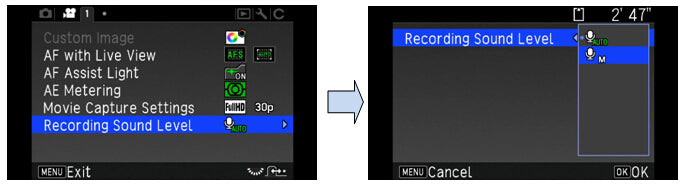
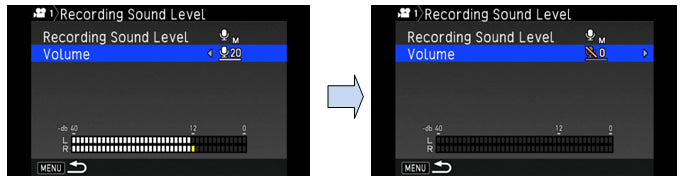
Sound Built-in stereo microphones, external microphone (stereo recording compatible), Recording Sound Level adjustable
Recording Time Up to 25 minutes; automatically stops recording if the internal temperature of the camera becomes high.
Custom Image Bright, Natural, Portrait, Landscape, Vibrant, Radiant, Muted, Bleach Bypass, Reversal Film, Monochrome, Cross Processing
Cross Processing Random, Preset 1-3, Favorite 1-3
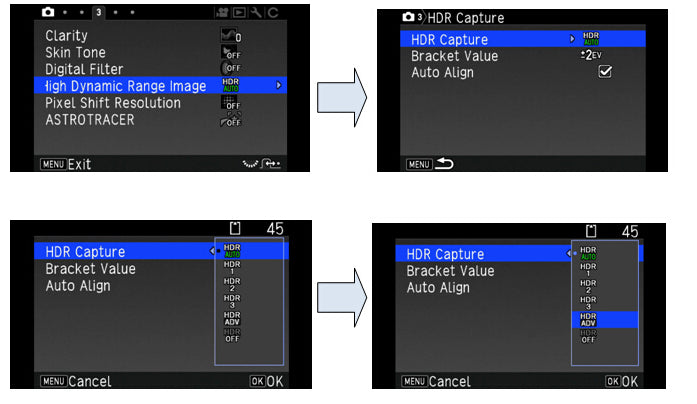
HDR Capture *Available only for Interval Movie Record Auto, Type1, Type2, Type3, Exposure Bracket Value adjustable

On the PENTAX 645Z, you can record Full HD movies at a maximum of 60i, and HD movies at a maximum of 60p. Even at the same resolution, when the large image sensor of the PENTAX 645Z is taken advantage of, depiction that overflows with three-dimensional detail can be obtained that rivals cinema camera super 35mm and 35mm full-frame cameras. Because you can apply Custom Image such as Cross Process effects, you can create movies with a diverse array of tones. Setting the maximum sensitivity of ISO 3200 for recording is possible. One of the merit is you can shoot movies with a minimum of lighting. In addition to a built-in stereo microphone, the PENTAX 645Z is also equipped with an external microphone jack (levels can be adjusted).
Is the Auto Focus works when capturing the movie?
Yes, the Auto Focus will work if press AF button on the back side of the camera.
The sound of AF function will be recorded.
Can the external microphone be used?
Yes, the external microphone can be connected to the microphone terminal of the camera.
The following specification is recommended.
Plug Stereo mini(Φ3.5mm)
System Stereo Electric Condenser
Power Plug-in system Voltage less than 2.0 V
Impedance 2.2KΩ
Can the custom image be used when capturing the movie?
Yes, the following setting can be used.
Bright, Natural, Portrait, Landscape, Vibrant, Radiant, Muted, Bleach Bypass, Reversal Film, Monochrome, Cross Processing
Can the exposure be adjusted when capturing the movie?
Yes, when selecting the P/Av/TAv mode, auto exposure compensation (-2~+2) wil be available.
Is the 4K interval movie can play back with PC?
To play back the interval movie, PC have to respond with 4K interval movie.
What type of storage medium does the camera use?
The 645Z uses SD, SDHC and SDXC Memory Cards. Also Eye-Fi card and FLUCARD.
*The built-in memory is not equipped. Please prepare the necessary capacity of the SD/SDHC Memory Card.
*It does not corresponding MMC (MultiMedia Cards).
Can Micro SD(SDHC) card be used with the PENTAX 645Z?
Not recommended. Please use a SD (SDHC) memory card.
Which SD (SDHC) Memory Cards are recommended for this camera?
We recommended the SD (SDHC) Memory Card brands shown in below.

Panasonic, Toshiba and SanDisk
*SD Memory Card - Capacities: 1GB, 2GB
*SDHC Memory Card - Capacities: 4GB, 8GB, 16GB, 32GB
*SDXC Memory Card - Capacities:
PENTAX
*FLU card O-FC1 - Capacities: 16GB

As of May 2014
* If saving still images, using a Class 6 or faster SD (SDHC) Memory Card.
 It gives no noticeable improvement in the continuous shooting speed but faster SD (SDHC) Memory card is recommended.
* "Recommended" denotes only that the operation of the product has been checked by RICOH IMAGING and in no way constitutes a guarantee to customers that the product is suited to their requirements. Memo: Class 6 --- SD (SDHC) Memory Card with a guaranteed write speed faster than 6MB/s (48Mbps).
What is the size of image file?
The file size varies depending on shooting conditions and subjects.
Approximate size of RAW image: around 70MB
Approximate size of JPEG image: around 20MB
Approximate size of TIFF image: around 150MB
Approximately how many images can be stored on SD (SDHC) Memory Card?
The actual number of images varies depending on shooting conditions and subjects.
The following table is approximate number of images that can be stored on SD memory card.

<Still>
  Recorded Pixels Quality Level 4GB 8GB 16GB 32GB 64GB
RAW 51M 8256×6192 PEF 35 71 143 288 574
RAW 51M 8256×6192 DNG 35 71 143 288 574
TIFF 51M 8256×6192   24 48 98 197 393
JPEG L:51M 8256×6192 ★★★ 103 211 424 852 1698
★★ 236 480 967 1940 3961
★ 467 952 1915 3842 7605
M:36M 6921×5184 ★★★ 147 300 604 1213 2411
★★ 335 682 1372 2753 5492
★ 663 1349 2715 5446 10746
S:21M 5376×4032 ★★★ 243 495 996 1998 3986
★★ 551 1121 2256 4526 8987
★ 1077 2193 4412 8851 17654
XS:3M 1920×1440 ★★★ 4801 3665 7376 14796 29077
★★ 3771 7675 15443 30979 61790
★ 6704 13645 27455 55074 98865

<Movie>
    4GB 8GB 16GB 32GB 64GB
Full HD
1920×1080
60i 00:15’51” 00:32’15” 01:04’54” 02:10’11” 04:19’41”
50i 00:18’50” 00:18’50” 01:17’10” 02:34’48” 05:08’46”
30p 00:15’51” 00:32’15” 01:04’54” 02:10’11” 04:19’41”
25p 00:18’50” 00:38’21” 01:17’10” 02:34’48” 05:08’46”
24p 00:19’35” 00:39’51” 01:20’12” 02:40’53” 05:20’54”
HD
1280×720
60p 00:15’51” 00:32’15” 01:04’54” 02:10’48” 04:19’41”
50p 00:18’51” 00:38’21” 01:17’10” 02:34’48” 05:08’46”
30p 00:26’50” 00:54’36” 01:49’51” 03:40’22” 07:19’31”
25p 00:31’42” 01:04’31” 02:09’48” 04:20’23” 08:39’21”
24p 00:32’53” 01:06’57” 02:14’42” 04:30’13” 08:58’57”

The maximum file size is 4GB for movie.
The maximum recording time is 25 minutes for movie.
What type of batteries can be used with 645Z?
The 645Z can be powered by the rechargeable lithium-ion battery D-LI90. (Used common with 645D)
How many photos can I take? or How long can I playback image?
Number of still images shot: Approx. 800
Playback time (Slideshow): Approx. 440 minutes
*The picture storage capacity is based on measuring condition in accordance with CIPA standards, while other data are based on our measuring conditions.
*Note: CIPA standards are standards formulated by the Camera and Imaging Products Association.

Battery Temperature Capture Recording time
D-LI90P 23℃ 650 images Approx 400min
Is there an AC adapter for the camera?
There is the optional AC adapter kit [K-AC132]
*The battery in your camera can’t be charged by connecting with the AC adapter.
What finishing touches setting are included in the Custom Image function?
Select from the following finishing touches:
Bright, Natural, Portrait, Landscape, Vibrant, Radiant, Muted, Bleach Bypass, Reversal Film, Monochrome and Cross Processing.
* The default setting is [Natural].
What is Dynamic Range (D-Range)?
Dynamic range is the ratio that indicates the light level expressed by the CCD sensor pixels from bright areas to dark areas. The larger it is, the better the whole range from dark to bright areas will appear in the picture. By expanding the dynamic range, you can expand the light level expressed by the CCD sensor pixels, making it more difficult for an overexposed area to occur in the image.
What is [Slow shutter Speed NR]?
When shooting with a long exposure for extremely dark scene such as night scene or starry sky, image noise (Thermal noise) may become noticeable by produce heat of CCD sensor.
[Slow shutter Speed NR] function can reduce such image noise.
Noise Reduction function can be set ON or OFF in [19.Slow shutter speed NR] in the custom menu.
1: ON:
The camera determines the conditions such as the shutter speed, sensitivity, and internal temperature, and automatically reduces noise as necessary.
Process of Slow shutter speed NR is executed after shooting.
Remaining image storage capacity display (S-LCD) will be brinks during processing slow shutter speed NR.
Slow shutter speed NR process takes the same time as exposure time.
The camera cannot take next picture until processing is completed.
2: OFF:
When shooting with a long exposure, the camera does not execute noise reduction as much as possible. If some noise is occurred but noise reduction process time is inconvenience, select noise reduction OFF. However, the camera automatically determines sensitivity and internal temperature then noise reduction may be executed forcibly.
What is [High-ISO Noise Reduction]?
You can reduce image noise with high sensitivity setting by using “High-ISO Noise Reduction”.
AUTO Perform proper noise reduction according to ISO setting.
LOW/MID/HIGH Perform noise reduction according to setting of LOW/MID/HIGH
CUSTOM Set noise reduction processl by ISO sensitivity.
OFF Noise Reduction does not perform.
※When “CUSTOM” is selected, select “Setting” and set it by ISO sensitivity.
What is the frame number of the consecutive shooting?
L, ★★★, Continuous H : Max. 3 frames / sec
JPEG/ up to 30 frames, RAW/ up to 10 frames, TIFF up to 12 frames

L, ★★★, Continuous L : Max. 1 frames / sec
JPEG/ up to 300 frames, RAW/ up to 25 frames, TIFF up to 15 frames
* With ISO 100
Can Multi-exposure shooting be used with the 645Z?
Yes. You can select from 2 to 2,000 shots.
Can a remote control be used with the 645Z?
Yes. The optical remote Control is available.
You can select the remote control shooting mode from [Remote control], [3 sec. delayed release] or [Remote continuous shooting]. You can use remote controller from front or rear side of body.
Can Interval shooting be used with the 645Z?
Yes.
[STILL] Interval: 2 sec. to 24 h. / Shot: 2 to 2000 shots / Trigger: Immediate, Appoint time
[MOVIE] Record size: 4K, FullHD, HD / Interval: 2 sec. to 1 h. / Record time: 14 sec. to 99 h. / Trigger: Immediate, Appoint time
Is there limit on exposure time for Bulb shooting?
No, there is no limit.
In the Bulb shooting, it can not be selected following mode in Drive mode.
Continuous/ Multi exposure continuous/ Interval/ Interval Composite/ Exposure bracket
What is the "Bright Area" warning?
When this function is activated, areas in the image that are too bright and have lost gradation detail will blink on the monitor during playback and instant review.
* Bright portions blink red on the monitor when [Bright/Dark area] is ON.
When using the external flash, Can the flash compensation be used?
Yes, an exclusive external flash (P-TTL auto) can be changed in the range of -2.0 to +1.0.
*The value of flash compensation is not recorded as compensation information.
* If the maximum flash output is exceeded when corrected to the plus (+) side, the compensation will not be effective.
Can large size flash be used with sync-socket?
Some of large size flash has extremely high terminal voltage (A few hundred volts) and it may be the cause of malfunction of camera. Please confirm the flash preliminarily.
*Polar conversion adapter can not be used.
How can I set two memory card slot?
Each slot can be set as following.
RESERVE When recording memory card(SD1) is full, other SD card(SD2) will be started to recording with the same file format.
DUPLICATE Recording same data to SD1/SD2
SEPARATE Recording RAW to SD1 and JPEG to SD2
What are the system requirements?
<Windows>
OS Windows 8.1 (32 bit/64 bit) / Windows 8 (32 bit/64 bit) / Windows 7 (32 bit/64 bit) / Windows Vista (32 bit/64 bit)
CPU Intel Core 2 Quad or higher
RAM 4GB or more
Free Disk Space Program installation and start-up: 100 MB or more of available space
Image file saving: Approximately 25 MB per file (JPEG) / approximately 70MB (RAW)
Monitor 1280 x 1024 dots, 24 bit full-color or more

<Macintosh>
OS Mac OS X 10.9 /10.8 / 10.7 / 10.6
Not possible to use universal logo due to no support for 10.5 PowerPC.
CPU Intel Core 2 Quad or later
RAM 4GB or more
Free Disk Space Program installation and start-up: 100 MB or more of available space
Image file saving: Approximately 25 MB per file (JPEG) or approximately 70MB (RAW)
Monitor 1280 x 1024 pixels, 24 bit full-color or more
Is there any software that transfer iamge to personal computer or operate 645Z by personal computer?
We are providing the software “IMAGE Transmitter 2”. (We will announce price and date of launch later.)

GR II

What accessories are provided with this camera?
The following accessories are providing with this camera.
•Wrist Strap
•USB cable
•Rechargeable lithium-ion battery DB-65
•USB power adaptor AC-U1
•Hot shoe cover (Set on camera)
•CD-ROM
•Instruction manual
* No camera case, AV cable, HDMI cable or SD (SDHC) Memory Cards are included with the camera
What are the optional accessories for this camera?
The optional accessories are as follows:
•Rechargeable Battery (DB-65) 
•Battery charger (BJ-6) 
•AC adapter (AC-5c)
•External viewfinder (GV-1)
•External mini viewfinder (GV-2)
•External TTL flash (GF-1)
•Hood and adapter (GH-3)
•Wide-angle conversion lens (GW-3)
•Soft Case (GC-5)
•Jacket (GC-6)
•Neck strap (GS-3)…GR logo
•Neck strap (ST-2)…RICOH logo
•Hand strap (GS-2)…GR logo
•Cable switch (CA-2)
•HDMI Cable (HC-1)
•AV Cable (AV-1)
Are there any other necessary items that are not included in the kit?
The kit does not come with an SD Memory Card, so please prepare an SD Memory Card with the necessary capacity.
You can use the optional HDMI Cable (HC-1) or a commercially available micro HDMI cable (type D) to connect to and play back recorded images or movies on a TV screen or other AV device.
What is the material of camera body.
It is a magnesium alloy
Does the camera have an optical viewfinder?
The camera itself does not have a built-in optical viewfinder.
However, there is a dedicated external optical viewfinder GV-1 and GV-2 available.
Does the camera have a zoom function?
No. However, there is a Crop function that can be set at 35mm or 47mm from original 28mm.
What is a [Crop] function ?
Select [Crop] at the shooting menu.
Choose [35mm] or [47mm], then the angle of view will change from original [28mm] to [35mm] or [47mm] and also display will change accordingly.
There are some restrictions for Picture format and size depends on a [Crop] setting.
 [35mm]: [L] size cannot select.
 [47mm]: [L] and [M] size cannot select.
* If you set [28/35mm] or [28/35/47mm] for Fn1/Fn2/Effect button, then you can switch angle of view accordingly by pressing each button.
Is there any function to reduce camera shake?
No.
What is the recording format?
Still: JPEG (Exif 2.3) , RAW(based on DNG)
Movie: MOV(Image: MPEG-4 AVC/H264, Sound: PCM(mono)
What is the RAW image development ?
In the Playback Mode, you can convert RAW images into JPEG format and then save them as new files.
At the Playback setting Menu, select [RAW Development] to save the JPEG image.
The following setting are available
 • Picture Size • White Balance • Brightness Compensation • Effect • Image Settings
 • Dynamic Range Compensation • Color Moiré Correction • Aspect Ratio • Noise Reduction
 • Color Space Setting • Ambient Brightness
The setting that were set at the time of shooting are initially selected.
Which SD Memory Cards have been tested for compatibility?
Compatibility with this camera has been tested with memory cards from the following manufacturers:
- Panasonic / Toshiba / SanDisk
 SD Memory Cards with capacities up to 2 GB
 SDHC Memory Cards with capacities up to 32 GB
 SDXC Memory Cards with capacities of 64 GB/128 GB
 As of June 2015


  • * "Recommended" denotes only that the operation of the product has been checked by RICOH IMAGING
     And in no way constitutes a guarantee to customers that the product is suited to their requirements.
  • * If saving movie images, using a Class 6 or faster SD (SDHC) Memory Card. It gives no noticeable improvement in the continuous shooting speed but faster SD (SDHC) Memory card is recommended.
  • * The GRll has 54MB built in memory.
  • * We don’t support more than 256GB SDXC card.
Can the UHS memory card be used?
Yes It can be used UHS-I SD (SDHC, SDXC) card.
Can the Micro SD (SDHC, SDXC) memory card be used?
No guarantee of proper operation with SD card adapter.
Please use SD (SDHC, SDXC) card.
When using SD (SDHC) Memory Cards, what should I do first?
Card that are unused or that have been used on other devices, such as another camera or a computer, must first be formatted on the GR II.
* Please note that formatting will delete any data recorded on the card.
* When using a new Eye-fi card, copy the install file of Eye-Fi Manager stored on the card to your computer before you format the card.
What kind of battery does the camera use?
The rechargeable lithium-ion battery DB-65 only.
The DB-60 or dry cell can't be used for GR II.
How long can the rechargeable lithium-ion battery DB-65 be used for?
Number of still images shot: Approx. 320
Playback time Approx. 190 minutes
Movie recording time: Approx. 45 minutes

  • * The number of still images shot is measured in conditions that comply with CIPA standards.
     (Includes: With a 50% flash use rate and the LCD monitor ON at 23°C.)
  • * The playback time, movie recording time and audio recording time are based on the result of in-house testing. It is result of a measurement and not guarantee for using time and number of still images.
  • * Note: CIPA standards are standards formulated by the Camera and Imaging Products Association.
How to charge the rechargeable battery DB-65?
  • * While the battery set in the camera, connect USB cable with the USB Power Adapter(AC-U1) and then plug into the consent. The charging time approx. 3 hours. (Room temperature: 25C)
  • * Also you can charge the battery by PC with USB cable. The charging time approx. 5 hours.
  • * Remove the battery from camera and charge it with the Battery Charger(BJ-6).
     The charging time approx. 2.5 hours.
Can rechargeable battery DB-60 be used to GR II?
No. Use the rechargeable battery DB-65 only.
Can dry battery be used to GR II?
No. Use the rechargeable battery DB-65 only.
Is there an AC adapter for the camera?
There is the optional AC adapter [AC-5c]
When the battery is removed, how long is the date set in the camera retained? And does the internal clock keep running?
Once a new battery has been loaded and left in the camera for at least 1 day, data in the camera remains backed up for approximately 5 days when the battery is removed. The clock also continues to run while the data is backed up.
* It is result of a measurement and not guarantee for back up time.
How to operate the Macro mode.
If you set Macro Mode by pressing the Macro button, you can shoot the subject as close as approx. 10cm (shooting range: approx. 12x8cm) away from the front edge of the lens. If you press Macro button once again, Macro mode will be cancelled.
* At the Auto shooting mode, Auto Macro is set and the Macro button is invalid.
* When [focus] is set to [MF], use the up-down dial to adjust the focus
Can GR II take black and white image?
Yes. There is [Effect] in shooting set menu, you can choose [Black & White], [B&W (TE)] or [Hi-Contrast B&W].
 [Black & White]: Takes black and white image
 [B&W (TE)]: Adds tint to black and white image.
 [Hi-Contrast B&W]: Takes images with stronger contrast than [Black & White]. Makes it possible to take images with a grainy feel, such as that created by using ultra-high–sensitivity film in a film camera or by push processing film at the development stage
What is the [Dynamic Range Compensation]?
You can expand an image gradation to make the bright and dark portions of an image clearly visible.
You can select from [Off], [Auto], [Weak], [Medium] and [Strong].

When dynamic range compensation is set, available ISO sensitivity is limited.
Setting ISO Step Setting [1EV] ISO Step Setting [1/3EV]
Min. Max. Min. Max.
Auto
Weak
Medium
Strong
ISO 400
ISO 200
ISO 200
ISO 400
ISO 6400
ISO 12800
ISO 12800
ISO 6400
ISO 320
ISO 160
ISO 200
ISO 320
ISO 8000
ISO 16000
ISO 12800
ISO 8000
  • • If dynamic range compensation is set, the [Auto-Hi] setting of the ISO sensitivity works as [Auto].
  • • When [ISO Setting] is set to [Auto], shooting may be performed with a lower ISO sensitivity than the minimum sensitivity listed above depending on the shooting conditions.
  • • When [Dynamic Range Compensation] is set to [Strong], noise tends to occur more easily in images.
  • • [Dynamic Range Compensation] cannot be set in the following cases.
     Continuous Mode
     Multiple Exposure Shooting
     Interval Shooting
     Interval Composite
  • • When the shooting location is too bright or too dark, dynamic range compensation may not be effective.
  • • When using dynamic range compensation, it is recommended to set [Exposure Metering] of the [Shooting] menu to [Multi].
What is the [Aperture Preview]?
You can check the depth of field before shooting the image.
  • • When [Effect Button Hold Setting] of the [Key Custom Options] menu is set to [Aperture Preview], the Aperture preview is available using the [Effect] button.
     If you press and hold [Effect] button when the aperture value is displayed on the shooting screen (such as when the shutter release button is pressed halfway), the aperture value set when shooting operates, and you can check the depth of field. When you release the [Effect button], the Aperture Preview mode is canceled.
  • • When the [Effect Button Hold Setting] is set to [Wi-Fi] (default value), the [Effect] button works as the switch
    To turn on/off the Wi-Fi function. In this case the Aperture Preview is not available.
  • • In the Aperture Preview mode, the shutter release button cannot be pressed fully, and the aperture value cannot be changed.
  • • Because the Aperture Preview is used for checking the depth of field, it may not function properly with AE.
What is the function of [AF Button]?
AEL/AFL: AE lock or AF lock is available in place of pressing the shutter release button halfway.
C-AF: While the AF button is pressed, "Continuous AF" which continuously focuses on the subject will be active, regardless of the [Focus] setting.
What is the function of [Interval Shooting]?
The camera takes pictures automatically at fixed intervals and number of pictures.
In the [Shooting] menu, select [Interval Shooting] and you can set the shooting interval from 1 second, 2 seconds or between 5 seconds and 60 minutes (in 5 seconds increments) and value of number of pictures from 1 to 99 or ∞.
* It is recommended to use the battery with sufficient power or optional AC Adapter(AC-5c).
* It is recommended to use a memory card with sufficient free space and a high speed memory card.
What is the function of [Interval Composite (Star Trails)]?
A series of continuous images taken at set intervals is merged in such a way that the bright areas remain.
Use this function when you want to record the trails of light formed by stars or the moon during nightscape shooting at a fixed position.
 • Interval: Set the shooting interval from the shortest value (Min.) up to 60 minutes.
 • Save interval Composite Img.: Sets how the images are saved.
               [Off]: Saves only the merged image.
               [Save Each Image]: Saves both the unmerged image and merged image in JPEG format
               [Save in process]: Saves each image at the point it is merged in JPEG format
* Please mount the camera on a tripod
* The flash cannot be used with this function.
* Set the mode dial to Av, Tv, TAv or M.
* It is recommended to use the battery with sufficient power or optional AC Adapter(AC-5c).
* It is recommended to use a memory card with sufficient free space and a high speed memory card.
What is the function of [B (Bulb)] and [T (Time)] ?
You can select B (Bulb) and T (Time) for the shutter speed in M mode.
B (Bulb): The image continues to be exposed while the shutter release button is pressed.
     The exposure ends when the shutter release button is released.
T (Time): The exposure begins when the shutter release button is pressed/
     The exposure ends when the shutter release button is pressed again.
  • * Please mount the camera on a tripod
  • * Operation is also possible using the optional cable switch (CA-2).
  • * The following function are not available at [B] and [T] setting.
     • Self -timer
     • Continuous Mode
     • Auto Bracket
     • Interval Shooting
     • Interval Composite
     • One Press M Mode
  • * In either mode, the camera automatically stops shooting once the limit has been reached.
     ISO sensitivity and Shutter speed limit
     ISO 100 to ISO 3200: 300 sec.
     ISO 3201 to ISO 25600: 30 sec.
  • * When [Slow Shutter Speed NR] of the [Shooting] menu is set to [On], noise reduction processing is carried out depending on the combination of the ISO sensitivity and shutter speed setting. If this is the case, it takes longer time to save the processed image than usual.
     ISO sensitivity and Shutter speed at the start of processing
     ISO 3200 or less: 8 sec. or more
     ISO 3201 or more: 4 sec. or more
  • * When using B/T, and [continuous Mode] is set in the [Shooting] menu, B/T is canceled, and the shutter speed for continuous shooting is set to 300 seconds. If [Continuous Mode] is set first, B/T cannot be set.
What is the function of [Slow Shutter Speed NR] ?
When [Slow Shutter Speed NR] of the [Shooting] menu is set to [On], noise reduction processing is carried out depending on the combination of the ISO sensitivity and shutter speed setting. If this is the case, it takes longer time to save the processed image than usual.
ISO sensitivity and Shutter speed at the start of processing
 ISO 3200 or less: 8 sec. or more
 ISO 3201 or more: 4 sec. or more
How to operate [ND Filter]?
You can decrease the brightness by using ND filter, so, it is useful that when you like to slower the shutter speed without changing the aperture.
With [ND Filter] in the [Shooting] menu, you can set whether or not to always use the camera’s internal ND filter
 Off: The ND filter is not used.
 Auto: The ND filter is used when the exposure is outside the linked range.
     The ND filter is used if the icon is displayed on the shooting screen when the shutter release button is depressed halfway.
     The ND filter is not used in P and M modes.
 On: The ND filter is always used. The icon is displayed on the shooting screen.
* If [ND Filter] is set to the Fn1, Fn2 and Effect buttons in the [Key Custom Options] menu, [Off], [Auto] and [On] for the ND filter can be switched with button operation only.
What is the Effect function?
The settings such as the hue can be changed to take distinctive images.
  • • Black & White: Takes a black and white image.
  • • B&W (TE): Adds tint to black & white images.
  • • Hi-Contrast B&W: Takes images with stronger contrast than [Black & White]. Makes it possible to take images with a grainy feel, such as that created by using ultra-high-sensitivity film in a film camera or by push processing film at the development stage.
  • • Cross Process: Takes images with tones that differ from the actual colors.
  • • Positive Film: Takes highly saturated images like those taken with positive film.
  • • Bleach Bypass: Takes images with low saturation and high contrast.
  • • Retro: Takes images that look like old photos.
  • • Miniaturize: Takes images that make the landscape look as if it has been miniaturized.
          The position and range of blurring in the image can be set.
  • • Shift Crop: Cuts out the upper or lower area of the image with a ratio of width to length of 1:1 when the camera is held vertically.
  • • High Key: Takes images with a bright atmosphere.
  • • HDR Tone: Takes images finished like a painting with enhanced fine contrast.
  • • Clarity: Takes images with enhanced subject texture and surface details.
  • • Brilliance: Takes images with adjusted subject brilliance.
  • • Slight: Takes slightly colored images.
  • • Vibrant: Takes images with quaint and vibrant shades of color.
  • • Bright: Takes sharp images.
  • • Portrait: Takes images with optimum color for human skin.

* If [Effect] is set, the setting for [Image Settings] are invalid.
* Settings made in [Effect] are not applied to RAW images.
Continuous Shooting
Set [Continuous Mode] of the [Shooting] menu to perform continuous shooting.
The autofocus is fixed in the first frame.
  • * If the shutter release button is pressed fully while pressing the AF button, continuous shooting can be performed following the [C-AF Continuous Setting] of the [Key Custom Options] menu.
  • * The maximum number of pictures that can be taken continuously for one press of shutter release button is 999.
  • * If the [Picture Format] of the [Shooting] menu is set to RAW or RAW+, the continuous shooting stops when the camera memory capacity for processing reaches full.
  • * The flash cannot be used with this function.
  • * It is recommended to use a memory card with sufficient free space and a high speed memory card.
How to set the noise reduction?
In the [Shooting] menu, select [ISO Setting/NR], then you can select [Off], [Auto] or [Manual].
If the [Manual] is selected, you can set each sensitivity for [Strong], [Medium] and [Weak].
What is [Focus Assist] function?
Intensifies the outlines and contrast inside the area, making it easier to adjust the focus.
[Shooting] > [FA/Move Target] > [Fn2 ]> [Focus Assist Setting], following setting can be set.
 [MODE 1]: Emphasizes edges.
 [MODE 2]: Emphasizes outlines
 [MODE 3]: Inverts black and white for MODE 1.
 [MODE 4]: Inverts black and white for MODE 2
Does GR II have a function of [Multiple Exposure shooting]?
Yes it does. It takes images while merging them together. Up to five images can be merged.
It is also possible fine setting such as below.
 * Merged images while adjusting the exposure value depending on the number of images.
 * Saves each unmerged image.
 * Saves each merged image.
 * Can retake the last captured image.
In the [Shooting] menu, you can select [Multiple Exposure Shooting].
Can we adjust the intensity of flash?
Yes you can adjust it in [Flash Exposure compensation] of the [Shooting] menu.
The intensity can be set in the range from -2.0 EV to +2.0 EV in increments of 1/3 EV.

* When the flash mode is set to [Manual Flash], the value set for [Flash Exposure Compensation] in invalid.
* If the ISO sensitivity is set to [Auto], the range of the flash light will reach is approximately 20 cm to 3.0 m from the front edge of the lens.
Setting the Flash Intensity for Manual Flash
The intensity of the internal flash can be set for when the flash mode is set to [Manual Flash].
To set amount of intensity, select [Manual Flash Amount] in the [Shooting] menu.
You can select from following fractions of the flash intensity.
[Full(1/1)], [1/1.4], [1/2], [1/2.8], [1/4], [1/5.6], [1/8], [1/11], [1/16], [1/22], [1/32] and [1/64].
About Recording Movies
Movies with sound can be recorded.
Movies are recorded as MOV files.

The frame rates (frames/second) can be selected depend on the [Still Image Size] setting.
Still Image Size
 Full HD (1920×1080): 30/25/24(frames/second)
 HD (1280×720): 60/50/30/25/24(frames/second)
 VGA (640×480): 30/25/24(frames/second)

* If the camera is operated while shooting, the operation sounds are also recorded.
* The following functions are not available in Movie mode.
 Flash, FA(Focus Assist) and Move target.
* Each movie can be a maximum of 25 minutes long or up to 4 GB in size.
* The maximum recording time per shooting depends on the capacity of the memory card.
 Shooting may end even before the maximum recording time is reached.
* Use a memory card of speed Class 6 or higher for recording movies.
* Use the battery with sufficient power.
* Recording format is MOV (MPEG-4 AVC/H264, with monaural sound).
Which OS are confirmed function with USB(PC) connection.
Following OS are confirmed function.
Windows: Windows Vista® / Windows® 7 / Windows® 8 / Windows® 8.1
Macintosh: OS X 10.7/10.8/10.9/10.10
How to transfer images to PC?
Connect the camera to PC with the USB cable that contained with camera.
The PC then recognized the memory of the camera automatically as the removable disc..
Double click the icon of the removable disc to open the folder, and copy the image file to PC.
* You can transfer the image from camera to PC without any software.
Can this camera use as PC camera?
No, it cannot.
Is there any application software included with the camera?
The [Digital Camera Utility 5] is contained in the CD-ROM for edit the image and develop the RAW file.
* The software for transfer the image is not included.
Does the camera support the "PRINT Image Matching III"?
Yes, it does.
Does the camera support the [PictBridge]?
No, it doesn’t.
Can cable switch be used for GR II?
Yes. It can be used optional cable switch [CA-2].
It is capable with B(Bulb) and T(Time) exposure.
* Length of cable switch(CA-2) is about 65cm
Can the common filter be used for GR II?
Yes. It can be used 49mm common filter with Hood & Adapter GH-3 (optional).
* The filter cannot install to the camera directly, the GH-3 is crucial item to use filter for GRll.
* If you use thicker filter, the hood may not be installed on top of it.
What is the Wide Conversion Lens GW-3?
The GW-3 is the wide conversion lens(x0.75) for GRll/GR.
It is used with optional Hood & Adapter GH-3 as a set.

* Set [Conversion Lens]of the [Setup] menu to [Wide] when using the conversion lens.
* The GW-1 and GW-2 which are used for former GRs (GR Digital, II, III and IV) are not usable for GRll/GR because of the diameter of the Adapter.
Can movies be watched on a television with High-definition movie?
Yes. You can watch the High-definition movie by using a commercially available HDMI cable (Type D) to connect the camera to a device with an HDMI terminal.
* The HDMI cable is not included in the kit.
* When connect HDMI cable to the camera, the camera will be set at Play back mode and the LCD monitor will be turned off automatically.
Is there any cable for connect analogue TV?
Yes, there is optional AV Cable (AV-1).
It can be selected from NTSC system and PAL system.

K-1

What is the Pixel Shift Resolution System?
By using the SR (Shake Reduction) mechanism, the K-1’s Pixel Shift Resolution System* captures four images of the same scene by shifting the image sensor by a single pixel for each image, then synthesizes them into a single, super-high-resolution composite image. Compared to the conventional Bayer system, this innovative system obtains all RGB color data in each pixel to deliver beautiful images with far more truthful colors and much finer details, without any hint of false color. This system also reduces high-sensitivity noise to a minimum. Images captured by the Pixel Shift Resolution System can be saved as RAW-format files. You can developed these files within the camera body while adjusting various parameters or turning the Pixel Shift Resolution effect on and off to create a new image. The electronic shutter is activate when capture the image by this system to reduce the camera shake.

*When using this system, the user is advised to stabilize the camera firmly on a tripod during shooting by setting the drive mode to self-timer or remote control, or using the mirror lock-up function.
*When the subject is on the move or camera shake occurs, the desired effect may not be obtained.
What is new Motion Correction function of Pixel Shift Resolution System?
When this function is activated, the camera automatically detects the amount of subject motion during continuous shooting and minimizes negative effects during the synthesizing process.
*The movement may not be sufficiently corrected when the subject is moving in certain directions and/or patterns. This function does not guarantee that the movement will be properly corrected for all subjects.

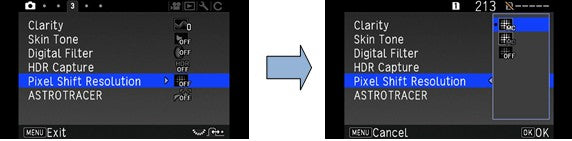
Set the function at the Capture 3 menu [Pixel Shift Resolution]

Motion Correction On Corrects mosaic-pattern noise when a moving object is detected, and creates a composite image.
Motion Correction Off Creates a composite image by combining the entire range of image.
Off Does not use Pixel Shift Resolution.
When shooting is performed, captured four images are displayed in turn, and then they are merged into a single image.

Caution:
*This function cannot be used in the following situations.
・In B or X mode.
・In movie mode.
*This function cannot be used in combination with some other functions. (Below figure)
*While this function is used, [Shake Reduction] of the Capture 4 menu is fixed to [OFF].

Memo:
*When [Pixel Shift Resolution] is assigned to Fx1 or Fx2, you can change the [Pixel Shift Resolution] setting by a simple button operation.
*When taking pictures with Pixel Shift Resolution, use a tripod and mount the camera on it securely. The use of Self-timer, Remote Control or Mirror Lock-up Shooting is recommended.

Restrictions on the Combinations of Pixel Shift Resolution function
○: Available ×: Not available
Pixel Shift Resolution
Flash ×
Drive Mode Continuous Shooting ×
Bracketing ×
Mirror Lock-up Shooting ◯
Multi-exposure ×
Interval Shooting ×
Interval Composite ×
Interval Movie Record ×
Star Stream ×
HDR Capture ×
AA Filter Simulator ×
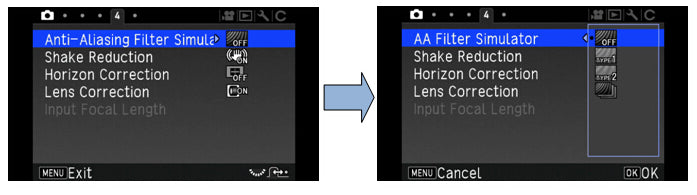
What is the AA filter Simulator function?
By using the camera’s SR mechanism to apply microscopic vibrations to the image sensor, the PENTAX-original AA (anti-aliasing) filter simulator effectively minimizes moiré and false color along the image’s edges, which are common problems when shooting subjects with minute patterns. The K-1 allows you to faithfully reproduce your creative intention on a captured image, either by simulating the AA-filter effect for well-balanced images or by opting for the AA-filter-free mode for greater resolving power.

Set the function at the Capture 4 [Anti-Aliasing Filter Simulator]


OFF Priority for resolution
TYPE 1 Takes pictures while balancing the resolution and moiré reduction.
TYPE 2 Priority for moiré reduction
Bracketing Takes consecutive 3 images in order of [OFF], [Type1], and [Type2].

Caution
*This function cannot be use in some capture modes or in combination with some other functions.
*[Bracketing] cannot be selected in the following situations.
 -In B mode.
 -When the drive mode is set to other than [Single Frame Shooting], [Self-timer] (12 seconds, 2 seconds), or [Remote Control] (now, after 3 seconds).
 -When HDR Capture is set.
 -When taking pictures with Pixel Shift Resolution system.
*When the shutter speed is faster than 1/1000 seconds, the full effect of this function cannot be achieved.
What is the Composition Adjustment function?
By using the Shake Reduction mechanism, the composition of the image can be adjusted. It is useful function when using a tripod while shooting with Live View and you like to adjust the composition at the same time.

Setting procedures
1.Select [ON] at the [Composition Adjust.] of the Capture 4 menu.
2.Press [MENU] button.
3.Press [LV] button.
 [Adjust the composition of the image] will be displayed.
4.Adjust the composition.
 The composition adjustment value will be displayed at the top/right corner of the LCD.
 -Composition movement (Up/Down/Right/Left, up to 24 steps)
 -The level of the composition (Up to 8 steps. Not available when the amount of composition adjustment steps is 17 or more)
5.Press [OK] button.
 Return to Live View capture mode.

Caution:
*You cannot use this function when the ASTROTRACER function is used.
Memo:
*The adjusted composition is saved even if Live View is ended or the camera is turned off. To reset the saved adjustment value when Live View is ended, set [Composition Adjust.] to OFF in [Memory] of the Capture 5 menu.
What are some of the features of the approx. 86K-pixel RGB metering sensor?
Traditional metering sensors only measured brightness, when this sensor also detects colors. The approx. 86,000 pixel resolving power is used to detect subject shape and movement with a high degree of accuracy. This makes for improved scene analysis ability where nearly all scenes are easily controlled.
Please tell me the feature of PENTAX Real-time Scene Analysis System.
Supported by the approximately 86,000-pixel RGB light-metering sensor and the new PRIME IV imaging engine, the PENTAX Real-time Scene Analysis System analyzes such factors as brightness distribution in the image field, the subject’s primary color and its motion with great accuracy and efficiency. In addition, by adopting a breakthrough artificial intelligence technology called deep learning to its image detection algorithm*, this system assesses each individual scene more accurately, while optimizing the accuracy and performance of the light-metering, exposure-control and autofocus systems, and selecting the most appropriate finishing touch for a given scene or composition.

*This original technology is available during viewfinder shooting when the exposure mode is set to Scene Analyze Auto and the Custom Image mode is set to Auto Select.
Please tell me about the Scene Analyze AUTO mode.
Supported by the PENTAX Real-time Scene Analysis System, the K-1’s Scene Analyze AUTO mode automatically optimizes exposure settings, and selects the most appropriate finishing touch for your subject. When using the optical viewfinder, it is also assisted by an algorithm that adopts the deep learning artificial intelligence technology, and makes an extensive analysis of a given scene based on the enormous volume of data accumulated from previous scenes.
Which items are included in the K-1 kit?
The K-1 kit includes the following items. (P & J are only available in Japanese market)

-Body mount cap KII (Pre-installed with camera)
-Hot shoe over FK (Pre-installed with camera) (*)
-Sync socket 2p cap (Pre-installed with camera) (*)
-Eyecup FT (Pre-installed with camera) (*)
-Triangular rings and Protective covers (Pre-installed with camera) (*)
-Operating Manual
-ME Viewfinder Cap (*)
-Battery grip terminal cover (Pre-installed with camera) (*)
-Strap O-ST162 (*)
-Rechargeable Lithium ion battery D-BC90P
-Battery Charger D-BC90P (*)
-AC plug cord D-CO2J (*)
-Software CD-ROM S-SW162
Items marked with a (*) can also be purchased separately.
*The included body mount cap Kll is not available as an optional accessory.
Make sure to ask for Body Mount Cap K if attempting to purchase one separately.
Are there any other necessary items that are not included in the kit?
The kit does not come with an SD Memory Card, so please prepare an SD Memory Card with the necessary capacity and capabilities for camera applications.
Prepare a USB cable with a micro B terminal that supports USB 2.0 cables if planning to connect the camera to a computer.
Use a commercially available mini HDMI cable (type D) to play back recorded images or movies on a TV screen or other AV device.
What optional accessories are available for this camera?
Available optional accessories are as follows. (P & J for only Japanese market)

-Hot Shoe Cover FK
-Sync. Socket 2P Cap
-Eyecup FT
-ME Viewfinder Cap
-Strap O-ST162
-Triangular rings and Protective covers
-Battery grip terminal cover
-Rechargeable Lithium-ion Battery D-LI90P
-Battery Charger Kit K-BC90PJ (includes the Battery Charger D-BC90P and AC plug cord)
*The above optional accessories are the same as those supplied with the camera.
-Body Mount Cap K
*The included body mount cap Kll is not available as an optional accessory.
-AC Adapter Kit K-AC132J (includes the AC Adapter D-AC120 and an AC plug cord)
-Battery Grip D-BG6
-Strap O-ST1401
-Hand Strap O-ST128
-Cable Switch CS-205
-Remote Control F
-Waterproof Remote Control O-RC1
-Auto Flash AF540FGZ II/AF360FGZ II/ AF201FG
What display languages are available for text and messages on the LCD monitor?
There are 20 display languages available, Japanese, English, French, German, Spanish, Portuguese, Italian, Dutch, Danish, Swedish, Finnish, Polish, Czech, Hungarian, Turkish, Greek, Russian, Korean, Simplified Chinese, Chinese Traditional.
How many bits for the A/D converter?
14 bits.
How long is the startup time?
Apporox. one second.
Can the cable switch CS-205 be used with this camera?
Yes, it can.
However, please note that the camera will no longer be water-resistant while the cover of the switch connector being open while the switch is used, requiring extra caution to be taken for use outdoors or indoors that around water.
Can Refconverter A/M be used with this camera?
Yes, it can.
Can a battery grip be used with the K-1?
The optional Battery Grip D-BG6 (sold separately) can be used with K-1.
If a Lithium-ion Battery D-LI90(P) is inserted into both the camera and the battery grip, the number of recordable images will be increased. AA batteries (qty.6) can be used if the tray is changed.
Can polarizing filters are used with this camera?
Circular type polarizing filters (C-PL/Circular PL) can be used. Normal, non-circular polarizing filters may adversely affect the exposure and AF and thus cannot be used.
Is there a proprietary case available for this camera?
No, there is not.
What is the exterior of the camera made of?
A magnesium alloy is used for Front cover, Back cover, Bottom cover and LCD monitor frame.
An engineering plastic contained glass fiber is used for Top cover.
Is the K-1 designed to be water-resistant/dust-proof?
Yes. There are 87 different sealing components used in the dials, buttons, joints and retractable parts of the camera, making it both dust-proof and water-resistant.
*For best protection against water or dust, use the camera with the Hot Shoe Cover FK, the Sync Socket 2P Cap and the Battery Grip Contact Cover attached.
If the water resists lens set with K-1, is it used in the rain?
When an AW- or WR-series lens* is mounted, the K-1 and its lens forms a remarkable digital imaging system totally resistant to demanding environmental factors.
However, it is not recommended to use these units in the rain for long time. When you are going to shoot in the rain continuously, it is recommended to use with rain cover etc.
*AW:All Weather, WR:Water Resistant

*A sealing is being also done around the joint and the operating parts, but when it's left while getting wet, there is a possibility to flood gradually. So if it is got wet, a drop of water will be wiped up briskly. About the lens, it is also recommend operating a zooming etc. after a drop of water is wiped up.
Is the K-1 designed to be cold-resistant?
Anticipating use in cold locations, PENTAX has subjected the K-1 to exacting environmental tests at temperatures as low as –10°C, and gathered a vast array of data on operational precision, response and stability of mechanisms and circuits, as well as fluctuations in battery voltage.* As the result, the K-1 assures solid, trouble-free operation even at freezing temperatures.
*Battery performance declines as the temperature goes down. When shooting in cold environments, the user is advised to carry spare batteries and keep them warm by storing them in an inside pocket
What are the size and resolution of the LCD monitor? Are there different brightness settings available?
Aiming at aligning the photographer’s line of sight precisely with the camera’s optical axis while providing a flexible angle adjustment, PENTAX has designed an ideal LCD monitor for the K-1 by creating an innovative mechanism that supports the monitor with four stays. This monitor has reached two difficult goals that conventional monitors have failed to attain: no deviation from the optical axis; and unrestricted tilt in all directions, horizontally or vertically. You can even tilt it up to a nearly 90-degree angle for low-angle and waist-level photography.

The specification of the LCD monitor is as follows.
Type Wide viewing angle TFT color LCD, Air-gapless glass. Flexible-tilt
Size 3.2 inch (aspect ratio 3:2)
Dots Approx. 1037K dots.
Adjustment Brightness, Saturation and Colors adjustment.
Outdoor monitor ±2 step adjustment.
What are the field of view and magnification of the view finder?
The specifications of the viewfinder are as follows.
Type Pentaprism Finder.
Coverage (FOV) Approx. 100%
Magnification Approx. 0.70x (50mmF1.4 at infinity)
Eye-Relief Length Approx. 20.6mm (From the view finder frame.)
Approx. 21.7mm (From the center of lens.)
Diopter adjustment Approx. -3.5 to +1.2m-1
Focusing screen Fixed Natural- Bright- Matte III focusing screen
View finder indication. AF point, Grid indication, Electronic Level, AF frame, Spot Metering frame and Crop.
Is the focusing screen changeable?
No. It is a fixed type focusing screen.
Specification for Auto Focus System using the viewfinder
The specification is as below.
Type TTL Phase-matching autofocus
Focus Sensor SAFOX 12, 33 points (25 cross type focus points in the center)
Brightness range EV-3 - 18 (ISO100, at normal temperature)
AF mode Single AF (AF.S), Continuous AF (AF.C)
AF point selection Spot, Select, Expanded Area (S, M, L), Zone select and Auto(33 AF points)
AF Assist Light Dedicated LED AF assist light

AF.S
Single mode
When the shutter button is pressed halfway, and the subject comes into focus, the focus is locked at that position.
The AF Assist light (LED) turns on as necessary.
AF.C
Continuous mode
The subject is kept in focus by continuous adjustment while the shutter button is pressed halfway. The shutter can be released even if the subject is not in focus.
・In AUTO mode, the autofocus mode is fixed to AF.S.
What are the characteristic of the autofocus system when shooting with viewfinder?
The K-1’s AF frame has been widened to optimize the ease of image composition over a larger 35mm full-frame image field. Thanks to the development of a new SAFOX 12 AF sensor module, its autofocus area is approximately 40 percent wider than a conventional AF frame.* In order to contain a longer optical path required for the expanded AF area within a compact housing, the K-1 features an optical design in which the incoming light is turned back within the AF module. Thanks to the optimization of the condenser lens, it also provides an increased number of AF sensor points (33 in total). This AF module boosts both compact dimensions and exceptional image-forming performance.

Main feature:
[Transparent viewfinder display]
The K-1’s transparent LCD viewfinder display allows you to select desired data, such as a grid display, and monitor it in the viewfinder. It comes in handy when correcting the camera’s tilt using the digital level or rearranging the image composition using a grid pattern, without taking the eye off the subject.


All viewfinder display data, except the cropping frame, is simulated to explain the function.

[Selection of data on viewfinder display]
Transparent data to be displayed in the viewfinder (grid pattern, Digital Level, AF frame and spot-metering frame) can be turned on and off independently to accommodate varying shooting conditions and preferred shooting styles.


[Digital Level]
The Digital Level displays the K-1’s horizontal and vertical tilt with two bar scales. Compared with the conventional type that utilizes an exposure bar scale, it not only makes it easier to identify the camera’s tilt, but also allows you to check the tilt and exposure status simultaneously. As the result, it greatly improves the camera’s operability during viewfinder shooting.


Set Electronic Level at Capture 5 menu

[33-point AF system with 25 cross-shaped sensors]
The K-1’s sophisticated 33-point AF system has a high-density distribution of AF sensors to effectively monitor crucial areas of the image field, while providing 25 cross-shaped sensors to assure extra-accurate focus on the subject.

[AF system with F2.8 luminance flux linear sensors]
Three center sensors are designed to detect the luminance flux of an F2.8 lens for high-precision auto focusing. When using a very fast lens with a shallow depth of field, these sensors can greatly improve the focusing accuracy.
Can you switch AF points as optionally?
Yes, You can select a desired focusing area from any of the 33 AF points within the AF frame.
Auto (33 AF points) Out of the 33 AF points, the camera automatically selects the optimum focusing area.
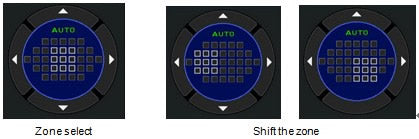
Zone select Out of the selected 9 AF points, the camera automatically selects the optimum focusing area.
Select Sets the focusing area to the user selected point from 33 points.
Expanded Area AF (S) Sets the focusing area to the user selected point from 33 points. When the subject happens to move out of the selected focusing area after being focused, 8 peripheral points are used as back-up points. Available only in AF.C mode.
Expanded Area AF (M) Sets the focusing area to the user selected point from 33 points. When the subject happens to move out of the selected focusing area after being focused, 24 peripheral points are used as back-up points. Available only in AF.C mode.
Expanded Area AF (L) Sets the focusing area to the user selected point from 33 points. When the subject happens to move out of the selected focusing area after being focused, 32 peripheral points are used as back-up points. Available only in AF.C mode.
Spot Sets the focusing area to the center of the 33 points.

Select


Zone select
This mode lets you select a set of nine points forming a square, which can be shifted as desired by moving the center point. It detects a subject placed within this square, optimizes the focus, and tracks its movement - all automatically.


Expanded area AF
This mode lets you select one of 33 AF points to focus on the subject, and makes the K-1 automatically track the subject and refocus on it with the help of the neighboring points, even when it moves away from the initial point. You can select the desired expansion area from 9, 25 or 33 points.*
*The number of AF points may decrease if the selected expansion area includes an area or areas outside the AF frame.


Auto tracking with PENTAX Real-time Scene Analysis System
Supported by the PENTAX Real-time Scene Analysis System, the K-1’s Auto Tracking function accurately detects the subject’s motion based on various factors including color, and then keeps pinpoint focus on the subject throughout the imaging process by automatically shifting the in-focus point.

Restriction of the focusing points for the combination with the K-1 and the particular lens
The K-1’s TTL Phase-matching AF sensor module (SAFOX 12) is restricted the focus points for 31 or 15 as below. (Only applied for the Phase-matching AF, the contrast AF has no such restrictions.)

K-1 Phase-matching AF (SAFOX 12) restricted focus points
Lens Classification Focus points
smc PENTAX-FA 28mmF2.8AL FA 31
smc PENTAX-FA 28mmF2.8 soft FA 31
smc PENTAX-F 35-80mmF4-5.6 F 31
smc PENTAX-FA 35-80mmF4-5.6 FA 31
smc PENTAX-FAJ 18-35mmF4-5.6 FA(J) 31
smc PENTAX-FAJ 28-80mmF3.5-5.6 FA(J) 31
smc PENTAX-DA 50-200mmF4-5.6 ED DA 31
smc PENTAX-DAL 50-200mmF4-5.6 ED DA(L) 31
smc PENTAX-DAL 50-200mmF4-5.6ED WR DA(L) 31
smc PENTAX-DA 50-200mmF4-5.6ED WR DA 31
smc PENTAX-DA FISH-EYE 10-17mmF3.5-5.6ED[IF] DA 31
smc PENTAX-DA21mmF3.2AL Limited DA 31
HD PENTAX-DA 21mmF3.2AL Limited DA 31
smc PENTAX-DA 15mmF4ED AL Limited DA 15
HD PENTAX-DA 15mmF4ED AL Limited DA 15
smc PENTAX-F 35-70mmF3.5-4.5 F 31
Does the K-1 have an AF assist light?
Yes, it does. The AF assist light is activated when AF.S mode is selected.
Can be select to ON or OFF by Capture menu 1.
What is specification of Live View mode?
Live View mode specification as follow.  
Type TTL method using the CMOS image sensor.
Focusing Mechanism Contrast detection ( Face detection, Tracking, Multiple AF points, select, spot)
Focus Peaking (ON/OFF)
Display Field of view approx. 100%, Magnified view (Up to 16 x), Grid display (4×4 Grid, Golden Section, Scale, Square 1, Square 2, Grid color Black/White), Histogram, Highlight Alert, Composition Adjustment.

AF mode during Live View:
Face detection Detects and tracks faces of people.
The main face detection frame for AF and AE is displayed in yellow.
Tracking Track the subject in focus.
The shutter can be released even if the subject is not in focus.
Multiple AF Points Sets the focusing area to the desired area. The sensor is divided in to 35 areas (7 horizontal by 5 vertical), and you can select a wider or narrower focusing area by using 1, 9, 15 or 25 of those 35 available areas.
Select Sets the focusing area by the pixel.
Spot Sets the focusing area to a limited area at the center.
*Caution: In AUTO mode, the autofocus mode is fixed to [Face detection].

Live View display
What type of Shake Reduction system is used for K-1?
The new-generation SR II (Shake Reduction II) features a five-axis mechanism to compensate for camera shake caused by horizontal and vertical shift (often generated in macro photography) and camera shake caused by roll, which is difficult to handle by lens-installed shake reduction mechanisms, in addition to more common camera shake caused by pitch and yaw. The SR II unit is controlled with great precision and provides a wide compensation range - as much as five shutter steps* - to expand the limits of handheld shooting.
*Measured in conformity to CIPA standards, using an HD PENTAX-D FA 28-105mm F3.5-5.6ED DC WR lens at a focal length of 105mm.
Does the SRll correspond to panning shots?
Yes it does.
When taking a panning shot, this mechanism efficiently controls the SR unit to detect only the direction of the camera’s movement, while compensating for all other affecting vectors. Because of this, the K-1 corresponds to both in normal shooting and panning photography, without requiring any switching operation.
Are there any lenses that the Shake Reduction (SR) function cannot be used with?
No, there are not. The SR function on the K-1 can be used with all supported lenses. Input a focal length in the range from 8 mm to 2000 mm when using a lens which cannot obtain the focal length information to the camera.
*The lens which can obtain the focal length information such as F/FAJ/FA series lenses are corresponded to five-axis mechanism (horizontal shift, vertical shift, roll, pitch and yaw), and the other older lenses are corresponded to three –axis mechanism (roll, pitch and yaw).
Will the Shake Reduction (SR) function work with other manufacturer’s lenses?
The camera operation (including exposure and the accuracy of focus) cannot be guaranteed when lenses from other manufacturers are used. We shall accept no responsibility or liability for problems arising from the use of such lenses. We will assume no responsibility or liability for accidents, damages, and malfunctions resulting from the use of lenses made by other manufacturers. Furthermore, while the Shake Reduction mechanism will still function with such lenses, the effectiveness of the results cannot be guaranteed.
Would it be OK to always leave the Shake Reduction (SR) function ON all the time?
It is recommended that the SR function is left on for handheld shooting.
*Turn off the Shake Reduction function when using the camera with a tripod.
*The function turns OFF automatically when the B (Bulb Exposure) shooting mode is selected and Drive Mode is set to self-timer, Remote control, or Mirror Lock-up Shooting.
Can the effect of the Shake Reduction be checked before a picture is taken?
The effects of the Shake Reduction function cannot be checked beforehand from the viewfinder image. However, if Live View is displayed, the effects can be viewed on the image monitor before images are taken.
It appears that the K-1 is not equipped with a low-pass filter. Does it come with any features that help prevent dust from collecting on the image sensor?
It does not come with a low-pass filter but does come with an infrared cutoff filter and other filters. The camera also includes an image sensor cleaning system “DR II” (“Dust Removal II”) that uses a piezoelectric element to produce ultrasonic vibrations to clean the image sensor.
What image recording formats are used?
The camera records images the versatile JPEG format or the high-quality and fully editable RAW (PEF/DNG) format. You can also select JPEG + RAW (PEF / DNG) and record in both formats simultaneously.
Can image rotation information be saved for images while the camera is held vertically or horizontally.
Yes, it can.
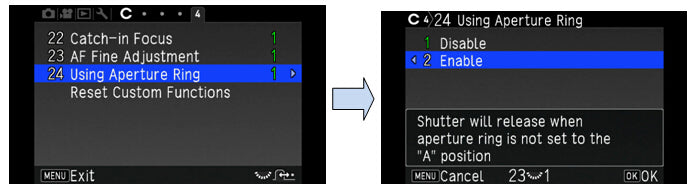
You can select ON/OFF at the C(Custom) menu 4, [22 Save Rotation Info].
How many different Custom Image options are available?
Select from the following 13 finishing touches: Auto select, Bright, Natural, Portrait, Landscape, Vibrant, Radiant, Muted, Flat, Bleach Bypass, Reversal Film, Monochrome and Cross Processing
What is a characteristic for the [Flat] of the custom image?
The [Flat] image is restricted the contrast but keep the key and sharpness level as original, so that the base image most tolerant to retouching.
Can you confirm which mode has been selected after captured the image used with [Auto Select] of custom image?
The information is recorded as EXIF data with images, you can confirm with the attached software [Digital Camera Utility 5], at the [Finishing touch].
What is the [Clarity control] function?
The Clarity control function is an image-processing technology effective in reproducing the glossy texture of metals and the clearness of the sky or splashing water. By adjusting the smoothness of a silky or shiny surface, it lets you control the quality of texture and the degree of clarity the range of between -4 and +4. It is set at Capture menu 3 and the [Clarity].
What is the [Skin Tone Correction] function?
The Skin Tone correction function restores a tender texture and a healthy tone of the subject’s skin, while keeping the high-resolution rendition in its hair and clothing and in the background.
*The Skin Tone Correction function can be activated and effective when the face is detected in the captured image regardless which AF mode or Exposure mode is selected.
* The Skin Tone Correction function can be selected at RAW development in K-1.


At the Capture menu 3, you can select from TYPE1, TYPE2 or OFF.
-TYPE1: Correct color and brightness of skin.
-TYPE2: Addition to TYPE1, make smoother skin.
What is the Digital filter?
You can apply special visual affects to the images to create and enjoy a distinctive and personalized work of art. There is a choice of nine digital filters during shooting and 21 digital filters during playback.
√: Available -: Not available
Capture Mode Playback Mode
---------------
Still pictures
Filter Name Contents/effects
Still pictures Movies
√ √ √ Extract Color Extracts one or two specific colors and makes the rest of the image black and white.
√ √ √ Replace color Replace the selected color to the other color.
√ √ √ Toy Camera Creates an image that looks as though it was shots with a toy camera.
√ √ √ Retro Creates an image with the looks of an old photo.
√ √ √ High Contrast Enhances the contrast in the image.
√ √ √ Shading Creates an image with darkened areas around the periphery.
√ √ √ Invert Color Creates an image with the colors inverted.
√ √ √ Unicolor Bold Extracts a select color and makes the rest of the image black and white.
√ √ √ Bold Monochrome Creates a monochrome image with enhanced contrast.
- - √ Tone Expansion Creates an image of unique contrast
- - √ Sketch Creates an image that looks as though it was drawn a pencil.
- - √ Water Color Creates an image that looks as though it was painted.
- - √ Pastel Creates an image that looks as though it was drawn with a crayon.
- - √ Posterization Lessens the tone of the image to create an image that looks as though it was hand-drawn.
- - √ Miniature Blurs part of the image to create a fake miniature scene.
- - √ Soft Creates an image with a soft focus throughout the image.
- - √ Starburst Creates an image of night scenes or lights reflected on water with a special sparkling look by adding extra glitter to the highlights.
- - √ Fish-eye Creates an image that looks as though it was shot with a fish-eye lens.
- - √ Slim Changes the horizontal and vertical ratio of images.
- - √ Monochrome Creates an image black and white.
- - √ Base
Parameter Adj.
Adjusts the parameters to create the desired image.
*It will take longer for images to be saved if a Digital Filter is selected when images are shot.
*Images shot using a Digital Filter at the time of shooting cannot later be converted into regular images that were taken without digital filter processing.
*Only JPEG and RAW files captured with the K-1 can be edited using the Digital Filter.
*The processed image is saved as a JPEG image.
Please tell me about the specifications of the drive mode.
The main specifications of drive mode are as follows
Drive Mode [Still Image]:
Single frame, Continuous (H, M, L), Self-timer (12s, 2s, continuous), Remote Control (immediately, 3 sec., continuous), Bracketing (2, 3 or 5 frames), Mirror Lock-up (Possible to use with Remote Control), Multi-exposure, Interval shooting, Interval Composite, Interval Movie Record, Star Stream.
[Movie]:
Remote Control

* Bracketing, Multi-exposure, Interval shooting, Interval Composite, Interval Movie Record and Star Stream mode are possible to use with Self-timer or Remote Control.
Continuous Shooting [35mm Full size]
Max. Approx. 4.4 fps, JPEG (L: ★★★ at Continuous H): up to approx. 70 frames, RAW: up to approx. 17 frames, RAW+: up to approx. 12 frames
Max. Approx. 3.0 fps, JPEG (L: ★★★ at Continuous M): up to approx. 100 frames, RAW: up to approx. 20 frames, RAW+: up to approx. 14 frames
Max. Approx. 0.7 fps, JPEG (L: ★★★ at Continuous L): up to approx. 100 frames, RAW: up to approx. 100 frames, RAW+: up to approx. 30 frames
[APS-C size]
Max. Approx. 6.5 fps, JPEG (L: ★★★ at Continuous H): up to approx. 100 frames, RAW: up to approx. 50 frames, RAW+: up to approx. 35 frames
Max. Approx. 3.0 fps, JPEG (L: ★★★ at Continuous M): up to approx. 100 frames, RAW: up to approx. 70 frames, RAW+: up to approx. 45 frames
Max. approx. 1.0 fps, JPEG ( L: ★★★ at Continuous L): up to approx. 100 frames, RAW: up to approx. 100 frames, RAW+: up to approx. 100 frames
* At ISO100
Multi-Exposure Composite Mode(Average/Additive/ Bright)
Number of Shots: 2 to 2000 images
Interval Shooting [Interval shooting]
Interval: 2s to 24h
Number of shots: 2 to 2000 times
Start Interval: Now / Self-timer / Remote Control / Set Time(Set Start Time)
[Interval Composite]
Interval: 2s to 24h
Number of shots: 2 to 2000 times
Start Interval: Now / Self-timer / Remote Control / Set Time(Set Start Time)
Composite mode: Average/Additive/ Bright
Save Process: On / Off
[Interval Movie Record]
Recorded Pixels: 4K / FullHD / HD
Interval: 2s to 24h.
Number of shots: 8 to 2000 times (8 to 500 times at 4K)
Start Interval: Now / Self-timer / Remote Control / Set Time(Set Start Time)
[Star Stream]
Recorded Pixels: 4K / FullHD / HD
Standby Interval: Minimum to 24h
Number of shots: 8 to 2000 times (8 to 500 times at 4K)
Start Interval: Now / Self-timer / Remote Control / Set Time(Set Start Time)
Fade-out: OFF / Weak / Medium / Strong
*The data based on when use the rechargeable lithium-ion battery (D-LI90P).
*The values given were collected under our measurement conditions using a sensitivity of ISO 100. The number of recordable images for continuous shooting may drop slightly depending on setting conditions such as the ISO setting.
*The continuous shooting speed of 4.4 fps does not depend on the writing speed of SD Memory Cards. However, the fps for continuous shooting may drop slightly with SD Memory Cards with a low writing speed.
Can a remote control be used with this camera?
Yes, it can. The optical remote control waterproof O-RC1 and Remote Control F are available for use with this camera.
Remote Control
Remote Control(3 second delay)
Remote Control(Continuous)
Can multi-exposure shooting be used with this camera?
Yes it can. You can select a number of shots between 2 and 200. In composite mode, you can select from [Average], [Additive] or [Bright]

Composite images are created as follows in each Composite Mode.
Average Creates a composite image with the average exposure.
Additive Creates a composite image with the cumulatively added exposure.
Bright Creates a composite image replacing only the positions that is brighter compared with the first image.
* Multi-exposure is not available when below functions are selected.
Clarity Control / Skin Tone Correction / Digital Filter / HDR (High Dynamic Range) capture / Pixel Shift Resolution / Distortion Correction / Diffraction Correction / ASTRO TRACER / AA Filter Simulator*1
*1: No Bracketing
What kinds of capture mode in the Interval shooting?
Please show as follows.
Capture mode:
Interval Shooting Takes pictures at set intervals and saves them.
Interval Composite. Takes pictures at set intervals and merges them into a single image.
Interval Movie Record. Takes still pictures at set intervals and saves them as a single movie file (Motion JPEG, file extension: AVI).
Star Stream Takes still pictures at set intervals and merges them into a single movie file (Motion JPEG, file extension: AVI).

Shooting condition:
Recorded pixels Select from [4K], [FullHD] or [HD] (Only for Interval Movie Record and Star Stream)
Interval Select from 2 seconds to 24 hours.
Standby Interval Select from minimum time or 1 second to 24 hours.
Number of shots Select from 2 to 2000 times
Start Interval Select when and how to take the first picture from [Now], [Self-timer], [Remote Control] or [Set Time].
Start Time Set the shooting start time when [Start Interval] is set to [Set Time].
Composite Mode Select from [Average], [Additive] or [Bright]. (Only for [Interval])
Save Process Select ☑ to save images in the middle of processing. (Only for [Interval])
Fade-out Select fade-out effect level of light trails. (Only for [Star Stream])

*Shooting procedures:
1. Select [INT] on the Drive Mode screen and press ▼.
2. Use ◀▶ to select [Interval], [Interval Composite], [Interval Movie Record] or [Star Stream].
3. Press [INFO] button.
4. Set the shooting condition.
5. Press [OK] button.
The screen of step 1. reappears.
6. Press [OK] button.
The camera returns to standby mode.
7. Press the shutter button.
When [Start Interval] is set to [Now], the first picture is taken. When set to [Set Time], shooting starts at the set time.
To cancel shooting, turn the main switch to [OFF].
After the specified numbers of shots are taken, the camera returns to standby mode.

Memo:
*For [Interval] and [Interval Composite] shooting, a new folder is created and the captured images are saved there. When another drive mode is used after interval shooting, a new folder is created again.
*The shortest time that can be set for [Interval] is 10 seconds when [Digital Filter], [Clarity] or [Skin Tone] is set, and 20 seconds when [HDR Capture] is set
*The second and later exposures start at the intervals set in [Interval]. If the exposure time is longer than the time set in [Interval], some of the pictures that are supposed to be taken at the set intervals are not actually taken. For example, if the time set in [Interval] is 2 seconds and the exposure time is 3 seconds, the first exposure has not yet finished at the time the second exposure is supposed to be started (2 seconds after shooting has started), and so the second picture is not taken. As the result, Interval Shooting ends before the specified numbers of shots are taken. In such cases, you can set [Standby Interval] in [13 Interval Shooting Options] of C2 menu so that every picture is taken at the set intervals after each exposure ends. The screen displayed in step 4 varies depending on the [13 Interval Shooting Options] setting.


*For [Interval] and [Interval Composite], the focus position used when the first picture is taken is Locked. When performing autofocus for each exposure, set [14 AF in Interval Shooting] to [Adjusts focus for each shot] in the C2 menu.


*For [Interval Composite] and [Star Stream], set the camera on a fixed support such as tripods during shooting.
*For [Interval Movie Record], [Pixel Shift Resolution] of the Capture 3 menu is fixed to [OFF].
*For [Star Stream], [Clarity], [Skin Tone], [Digital Filter], HDR Capture] and [Pixel Shift Resolution] of Capture 3 menu and [Shake Reduction] and [Horizontal Correction] of Capture 4 menu are fixed to [OFF]
*For [Star Stream], the camera operates in [Manual] mode regardless of the mode dial setting.
What is HDR Capture?
HDR (High Dynamic Range Capture) is takes three consecutive images at three different exposure levels to create a single composite image with them.

1. Select the capture type from AUTO, Type1, Type2, Type3 or Advanced HDR and press [OK].
2. Set the range in which to change the exposure in [Bracket Value] from ±1EV,±2EV or ±3EV.


3. Set whether to use [Auto Align] or not.
4. Press [MENU] button twice, the camera returns to standby mode.

Memo:
*The HDR type can also be changed by the Smart Function.

Caution:
*HDR Capture is not available in [B], [X] and [Movie] mode.
*HDR Capture cannot be used in combination with some other functions.
*When the drive mode is set to [Interval Shooting] or [Interval Movie Record], [Auto Align] is fixed to [Off].
*When [Auto Align] is set to [Off], [Shake Reduction] of the Capture 4 menu is fixed to [OFF].
*For HDR Capture, multiple images are combined together to create a single image, so it may take time to save the image.

K-3 II

What are the most prominent features of this product?
The K-3 II produces exceptionally high-resolution images, supported by the new Pixel Shift Resolution System, which is designed to optimize the imaging power of 24.35 effective megapixels.
It incorporates a GPS module and an electronic compass to provide GPS logging and astronomical tracking functions.
It also provides much-upgraded AF performance and high-speed continuous shooting at a top speed of approximately 8.3 images per second, thanks to the optimized AF algorithm.
The K-3 II packs all these advanced features in a dustproof, weather-resistant body.
How does the K-3 II differ from the K-3?
Differences in functions from those on the K-3 models are listed below.
  • • The addition of the Pixel Shift Resolution System, a new feature created by utilizing the SR (Shake Reduction) mechanism
  • • Upgraded SR mechanism performance, for effective camera shake compensation of up to 4.5 shutter steps
  • • The incorporation of a GPS module and an electronic compass to log GPS data and use the ASTROTRACER function without the need for an additional GPS unit
  • • Faster, more responsive phase-matching AF system, supported by the optimized algorithm
  • • The addition of diffraction compensation to the list of compensation parameters
  • • The removal of a built-in flash unit
What is the Pixel Shift Resolution System?
This latest technology captures four images of the same scene by shifting the camera's image sensor unit by a single pixel for each image using the SR mechanism, and then synthesizes them into a single composite image. Since it obtains all color data in individual pixel, it delivers super-high-resolution images. Compared with conventional systems, it also reduced the level of high-sensitivity noise significantly.

Note: When shooting please keep the camera stationary using a tripod etc. and drive mode is set to self-timer or remote control or mirror lock-up.
If there are things that are moving on the screen, grid-like noise may occur.

* This function cannot be used in the following situations.
 ・In Green, Bulb, or X mode
 ・In Movie mode
 ・This function cannot be use in combination with some other function. (Table below)
 ・While this function is used, [Shake Reduction] is fixed to [OFF].

Restrictions on the Combinations of this function:        √: Available X: Not available
Flash X
Drive mode Continuous Shooting X
Exposure Bracketing X
Mirror Lock-up Shooting √
Multi-exposure X
Interval Shooting X
Interval Composite X
Interval Movie Record X
HDR Capture X
Lens correction √
AA Filter Simulator X
What does the “AA Filter Simulator” function do?
It produces a moiré reduction effect using the Shake Reduction unit. There are three settings to choose from: OFF, Type1, Type2, and Bracketing.
What are some of the features of the approx. 86K-pixel RGB metering sensor?
The metering sensor in the K-3II is more sophisticated than that in previous models and also works to measure color information. This allows for more accurate metering due to a greater amount of information being collected. The sensor works well even in low-light situations with levels down to -3 EV (when a FA 50-mm F1.4 lens is used).
What are the differences between the new Multi Auto White Balance function and the Auto White Balance function used previously?
The previous white balance function worked on the image display as a whole. The new Multi Auto White Balance function splits the image into different areas and runs white balance on each area separately.
For example:
  • - Images split into areas affected by the light from the flash and areas not affected by the flash.
  • - Images split into areas lit by natural sunlight and areas lit by artificial lighting equipment.
    Calculations are made for each separate area, ensuring that a more natural-looking white balance effect is achieved under a mixture of lighting conditions from various different light sources.
How many AF points are there total?
There are 27 AF points altogether, and 25 of those are cross-type AF points.
How many f2.8 AF point sensors does the K-3II have?
Three. There is a line sensor for measuring flux located at the center as well as one above and one below.
What is included in the K-3II kit?
The K-3II includes the following:

- Body mount cover (Installed on camera)
- Hot shoe cover FK (*)
- Sync socket 2P cap (Installed on camera) (*)
- Eyecup Fs (*)
- 2 Triangular rings (*)
- 2 Protective covers (*)
- Operating Manual
- Warranty card
- ME Viewfinder Cap (*)
- Battery grip terminal cover (Installed on camera) (*)
- Strap O-ST132 (*)
- Rechargeable Lithium-ion Battery D-LI90P (*)
- Battery Charger D-BC90P and AC plug cord (*)
- Software CD-ROM S-SW140 (Digital Camera Utility 5)
Items marked with a (*) can also be purchased separately.
* The included body mount cover is not available as an optional accessory.
Make sure to ask for Body Mount Cap K if attempting to purchase one separately.
Are there any other necessary items that are not included in the kit?
The kit does not come with an SD Memory Card, so please prepare an SD Memory Card with the necessary capacity and capabilities for camera applications.
Prepare a USB cable with a micro B terminal that supports both USB 3.0 cables and USB 2.0 cables if planning to connect the camera to a computer.
Use a commercially available mini HDMI cable (type D) to play back recorded images or movies on a TV screen or other AV device.
What optional accessories are available for this camera?
Available optional accessories are as follows:

  • - Hot Shoe Cover FK
  • - Sync Socket 2P Cap
  • - Eyecup Fs
  • - ME Viewfinder Cap
  • - Strap O-ST132
  • - Rechargeable Lithium-ion Battery D-LI90P
  • - Battery Charger Kit K-BC90PJ (includes the Battery Charger D-BC90P and an AC plug cord)
    The above optional accessories are the same as those supplied with the camera.

  • - FLUCARD FOR PENTAX O-FC1, 16GB
  • - Body Mount Cap K
    *The included body mount cover is not available as an optional accessory.
  • - AC Adapter Kit K-AC132J (includes the AC Adapter D-AC120 and an AC plug cord)
  • - Battery Grip D-BG5
  • - Camera Case O-OC90
  • - Strap O-ST1401
  • - Hand Strap O-ST128
  • - Magnifying Eyecup O-ME53
  • - Cable Switch CS-205
  • - Remote Control F
  • - Remote Control Waterproof O-RC1
  • - Focusing Screen ML-60/MF-60/MI-60/ME-60
  • - Auto Flash AF540FGZ II/AF360FGZ II/ AF201FG
 *Click here for pictures and other relevant information.
What display languages are available for text and messages on the LCD monitor?
Language available are 20 language of the Japanese, English, French, German, Spanish, Portuguese, Italian, Dutch, Danish, Swedish, Finnish, Polish, Czech, Hungarian, Turkish, Greek, Russian, Korean, Chinese (Simplified), and Chinese (Traditional).
Is there a proprietary case available for this camera?
Proprietary case available are O-CC90 and O-CC160.
What is the exterior of the camera made of?
A magnesium alloy is used for the body exterior.
Is the K-3II designed to be water-resistant/dust-proof?
There are 92 different sealing components used in the dials, buttons, joints, and retractable parts of the camera, making it both dust-proof and water-resistant.
* For best protection against water or dust, use the camera with the Hot Shoe Cover FK and the Sync Socket 2P Cap attached.
What are the size and resolution of the LCD monitor? Are there different brightness settings available?
The specifications of the LCD monitor is as follows.
Type Wide viewing angle TFT color LCD with AR coating, Air-gapless glass.
Size 3.2 inch (aspect ratio 3:2)
Dots Approx. 1037K dots
Adjustment Brightness, Saturation and Colors adjustable
What are the field of view and magnification of the viewfinder?
The specifications of the viewfinder are as follows.
Type Pentaprism Finder
Coverage (FOV) Approx. 100%
Magnification Approx. 0.95x (50mmF1.4 at infinity)
Eye-Relief Length Approx. 20.5mm (from the view window),
Approx. 22.3mm (from the center of lens)
Diopter Adjustment Approx. -2.5m to + 1.5m-1
Focusing Screen Interchangeable Natural-Bright-Matte III focusing screen
Is the focusing screen interchangeable?
There are four screens available for use including the standard one: ML-60/MF-60/MI-60/ME-60.
What is the field of view in Live View?
The specifications of the Live View is as follows.
Type TTL method using CMOS image sensor
Focusing Mechanism Contrast detection (Face detection, Tracking, Multiple AF points,
Select, Spot) Focus peaking: ON/OFF
Display Field of View approx. 100%, Magnified view (2x, 4x, 8x, 10x),
Grid display (4×4 Grid, Golden Section, Scale display), Histogram, Bright area warning, Composition Adjustment
It appears that the K-3II is not equipped with a low-pass filter. Does it come with any features that help prevent dust from collecting on the image sensor?
It does not come with a low-pass filter but does come with an infrared cutoff filter and other filters. The camera also includes an image sensor cleaning system “DR II” (“Dust Removal II”) that uses a piezoelectric element to produce ultrasonic vibrations to clean the image sensor and also a Dust Alert function.
How many bits is the A/D converter?
14 bits.
How long is the startup time?
Approximately 0.3 seconds.
Where is the audio microphone (stereo/monaural) located?
The audio microphone is on the upper left side of the lens mount as viewed from the front.
The built-in microphone is a monaural microphone.
Can an external microphone be connected to the K-3II? If so, what kind of specifications would work best?
The specifications of external microphone are recommended to the following.
Plug Stereo mini plug (Φ3.5mm)
Format Stereo electret condenser
Power Guarantee of proper operation at 2.0V)
Impedance 2.2KΩ
Can the Cable Switch CS-205 be used with this camera?
Yes, it can.
However, note that the camera will no longer be water-resistant while the Cable Switch CS-205 is in use due to the cover to the switch connector being open while the switch is used, requiring extra caution to be taken for use outdoors or around water indoors.
Can Refconverter A/M be used with this camera?
Yes, it can.
Some vignetting may occur in the information display in the viewfinder when using the Refconverter M, however.
Can a battery grip be used with the K-3II? Can the same battery grip as for the K-5/K-5 II be used with this camera?
The optional Battery Grip D-BG5 (sold separately) can be used with the K-3 or K3II. If a Lithium-ion Battery D-LI90P is inserted into both the camera and the battery grip, the number of recordable images will be increased. AA batteries (qty. 6) can be used if the tray is changed.
  • * The Battery Grip D-BG1 (for *ist D series models), D-BG2 (for K20D, K10D models), D-BG3 (for K200D models), and D-BG4 (for K-7, K-5, K-5 II, K-5 IIs models) cannot be used with the K-3II.
Can polarizing filters are used with this camera?
Circular type polarizing filters (C-PL/Circular PL) can be used. Normal, non-circular polarizing filters may adversely affect the exposure and AF and thus cannot be used.
What image recording formats are used?
The camera records images in the versatile JPEG format or the high-quality and fully editable RAW (PEF/DNG) format. You can also select JPEG+RAW (PEF/DNG) and record in both formats simultaneously.
Can image rotation information be saved for images taken while the camera is held vertically or horizontally?
Yes, it can.
Does the camera have a Superimpose function?
The camera is equipped with the Superimpose AF Area function that causes the selected AF points to light up red in the viewfinder.
[Superimpose AF Area] can be toggled ON/OFF in the [Custom Setting] menu.
Can you switch between AF points as desired?
Yes, you can select a desired focusing area from any of the 27 AF points within the AF frame.
What type of shake reduction system is used?
The K-3II is equipped with a Sensor-Shift Shake Reduction system built right into the body of the camera.
How effective is the Shake Reduction in terms of shutter speed steps?
The effect of Shake Reduction is equivalent to up to around 4.5 EV steps in shutter speed.
* The Shake Reduction effect may vary depending on the focal length of the lens, distance to the subject, shooting conditions, and individual technique.
Will the Shake Reduction (SR) function work with other manufacturers’ lenses?
Camera operation (including exposure and the accuracy of focus) cannot be guaranteed when lenses from other manufacturers are used. Lenses from other manufacturers can be used if they are K-mount lenses. However, responsibility for such use shall fall squarely on the user. We shall accept no responsibility or liability for problems arising from the use of such lenses. We will assume no responsibility or liability for accidents, damages, and malfunctions resulting from the use of lenses made by other manufacturers. Furthermore, while the Shake Reduction mechanism will still function with such lenses, the effectiveness of the results cannot be guaranteed.
Are there any lenses that the Shake Reduction (SR) function cannot be used with?
No, there are not. The SR function on the K-3II can be used with all supported lenses. Use a focal length in the range from 8 mm to 2000 mm for lenses for which focal length information cannot be obtained.
What is the relationship between cameras shake and shutter speed?
It is generally said that the slowest shutter speed to use to avoid blur is 1/ (focal length) second (in 35mm format).
However, with cameras featuring an APS-C size image sensor (like the K-3II), please consider the focal length as 1.5 times longer.
For example, a 200 mm lens is equivalent to a 300 mm lens in 35 mm format, and thus, generally speaking, the slowest shutter speed for such a lens is 1/300 sec. You can expect Shake Reduction to be effective at shutter speeds 3 steps slower than 1/300.
Would it be OK to always leave the Shake Reduction (SR) function ON all the time?
It is recommended that the SR function be left on for manual shooting with the camera in hand.
  • * Turn off the Shake Reduction function when using the camera with a tripod.
  • * The function turns OFF automatically when the B (Bulb Exposure) shooting mode is selected and Drive Mode is set to Self-timer, Remote Control, or Mirror Lock-up Shooting.
Can the effect of the Shake Reduction function be checked before a picture is taken?
The effects of the Shake Reduction function cannot be checked beforehand from the viewfinder image. However, if Live View is displayed, the effects can be viewed on the image monitor before images are taken.
How many different Custom Image options are available?
Select from the following eleven finishing touches: Bright, Natural, Portrait, Landscape, Vibrant, Radiant, Muted, Bleach Bypass, Reversal Film, Monochrome, and Cross Processing.
* The default setting is [Bright].
What is the Digital Filter?
This mode lets you change the color tone of an image and perform special processing on an image. The Digital Filter can be applied when a picture is taken. You can also apply digital filter effects to images that have been shot in playback mode.

√: Available -: Not available

Capture Mode Playback
Mode
Filter Name Effects
Still pictures Movies Still pictures
- - √ Base Parameter Adj Adjusts the parameters to create the desired image.
√ √ √ Extract Color Extracts one or two specific colors and makes the rest of the image black and white.
√ √ √ Toy Camera Creates an image that looks as though it was shot with a toy camera.
√ √ √ Retro Creates an image with the look of an old photo.
√ √ √ High Contrast Enhances the contrast in the image.
√ √ √ Shading Creates an image with darkened areas around the periphery.
√ √ √ Invert Color Creates an image with the colors inverted.
√ √ √ Unicolor Bold Extracts a select color and makes the rest of the image black and white.
√ √ √ Bold Monochrome Creates a monochrome image with enhanced contrast.
- - √ Tone Expansion Creates an image of unique contrast.
- - √ Sketch Creates an image that looks as though it was drawn with a pencil.
- - √ Water Color Creates an image that looks as though it was painted.
- - √ Pastel Creates an image that looks as though it was drawn with a crayon.
- - √ Posterization Lessens the tone of the image to create an image that looks as though it was hand-drawn.
- - √ Miniature Blurs part of the image to create a fake miniature scene.
- - √ Soft Creates an image with a soft focus throughout the image.
√ - √ Starburst Creates an image of night scenes or lights reflected on water with a special sparkling look by adding extra glitter to the highlights.
√ - √ Fish-eye Creates an image that looks as though it was shot with a fish-eye lens.
- - √ Slim Changes the horizontal and vertical ratio of images.
* It will take longer for images to be saved if a Digital Filter is selected when images are shot.
* Images shot using a Digital Filter at the time of shooting cannot later be converted into regular images that were taken without digital filter processing.
* Only JPEG and RAW files captured with the K-3II can be edited using the Digital Filter.
* The processed image is saved as a JPEG image.
Does the K-3II support PRINT Image Matching (P.I.M.) III™ and Exif Print (Exif 2.2)?
JPEG images captured with this camera support both. RAW images do not.
Does the K-3II support PictBridge?
No, it does not.
Does the camera support infrared communications (IrSimple and IrSS)?
No, it does not.
Do menu options and other settings reset when the battery is taken out of the camera?
Settings other than the date and time are retained when the battery is removed.
The date and time settings are retained for at least 48 hours after the battery is removed if the battery was in the camera for at least 24 hours continuously before it is removed.
Please tell me about the specifications of the drive mode.
The main specifications of drive mode are as follows.
Mode Selection Still Image:
Single frame, Continuous (H, M, L), Self-timer (12s, 2s), Remote Control (immediately, 3 sec., continuous), Exposure Bracketing (2, 3 or 5 frames/ Possible to use with Self-timer or Remote Control ), Mirror-up (Possible to use with Remote Control), Interval shooting, Interval Composite

Movie:
Remote Control, Interval Movie Record
Continuous Shooting TBD: Max. Approx. 8.3 fps, JPEG (L: ★★★ at Continuous H): up to approx. 60 frames, RAW: up to approx. 23 frames
TBD: Max. Approx. 4.5 fps, JPEG (L: ★★★ at Continuous M): up to approx. 100 frames, RAW: up to approx. 32 frames
TBD: Max. approx. 3.0 fps, JPEG ( L: ★★★ at Continuous Lo): up to approx. 200 frames, RAW: up to approx. 52 frames
* ISO100
Multi-Exposure Composite Mode(Additive/Average/Bright)
Number of Shots(2 to 2000 images)
Interval Shooting Still Image
Interval: 2s*1 to 24h.
Number of shots: 2~2000images
Start Interval: Now/Set Time

Movie
Recorded size: 4K/FullHD/HD
Interval: 2s to 1h.
Recording time: 14s to 99h.
Start Interval: Now/Set Time
* 1 If the digital filter is set, interval is 10 seconds. If the HDR shooting is set, interval is 20 seconds.

  • * When use the rechargeable lithium-ion battery (D-LI90P).
  • * The values given were collected under our measurement conditions using a sensitivity of ISO 100. The number of recordable images for continuous shooting may drop slightly depending on setting conditions such as the ISO setting.
  • * The continuous shooting speed of 8.3 fps does not depend on the writing speed of SD Memory Cards. However, the fps for continuous shooting may drop slightly with SD Memory Cards with a low writing speed.
Can a remote control be used with this camera?
Yes, it can. The optional Remote Control Waterproof O-RC1 and Remote Control F are available for use with this camera.
You can select remote control shooting mode from [Remote Control], [Remote Control (3 sec. delay)], [Remote Continuous Shooting], [Exposure Bracket+Remote Ctrl], [Remote Control+Mirror Lock-up], and [Remote Control+Multi-exposure].
Can Multi-exposure Shooting be used with this camera?
Yes, it can. You can select a number of shots between 2 and 2000. In Composite Mode, you can select from [Average], [Additive], or [Bright].
* Multi-exposure is not available when HDR Capture (high dynamic range) is selected.
Can Interval Shooting be used with this camera?
Yes, it can.
Select from 2 to 2000 for Number of Shots and from 2 sec. to 24 hrs. for Interval.
  • * Interval Shooting is available when HDR Capture (high dynamic range) is selected. However, the available Interval settings with HDR Capture are from 20 sec. to 24 hrs. instead. (The Auto Align function for HDR is disabled in Interval Shooting mode.)
What is [Slow Shutter Speed NR]?
When you use a digital camera with a long exposure to shoot pictures, image noise (image roughness or unevenness) becomes more noticeable. The K-3II has a Noise Reduction function that reduces image noise.
  • * When [Slow Shutter Speed NR] is ON, it will take longer to save images.
  • * The default setting is [Auto]. The camera determines conditions such as exposure time, sensitivity, and internal temperature and automatically applies Noise Reduction as necessary.
     On: Applies Noise Reduction when the exposure time is longer than 1 second.
     Off: Does not apply Noise Reduction.

K-50

How does this model differ from the K-30?


- Supports super-high-sensitivity shooting (ISO100 to ISO51200) in Standard Output AUTO mode (only up to ISO12800 with the K-30).
- Equipped with quality level tuning that enables expressing the edges in still images even more naturally.
- Eye-Fi card compatible.
- Package includes AA Battery Holder and AA lithium batteries.
(The optional rechargeable lithium-ion battery D-LI109 can also be used.)
What is included in the K-50 kit?


The K-50 includes the following:
- Hot shoe cover FK(*)- Eyecup FR(※)
- Body mount cover- USB Cable I-USB7 (*)
- Strap O-ST132 (*) - AA Battery Holder D-BH109 (*)
- Software (CD-ROM) S-SW138- Four AA lithium batteries
- ME Viewfinder Cap(*) - Operating manual

Items marked with a (*) can also be purchased separately.
Are there any other necessary items that are not included in the kit?


The kit does not come with an SD Memory Card, so please prepare an SD Memory Card with the necessary capacity.
You can connect the camera to a TV or other device and display the Live View image or play back captured images on the monitor by using the optional AV cable I-AVC7.
What optional accessories are available for this camera?


Available optional accessories are as follows:
- Hot Shoe Cover FK
- Eyecup FR
- ME Viewfinder Cap
- Strap O-ST132
- USB Cable I-USB7
- AV Cable I-AVC7
- AA Battery Holder D-BH109
- Rechargeable Lithium-ion Battery D-LI109
- Battery Charger Kit K-BC109 (includes the Battery Charger D-BC109 and an AC plug cord)
- Body Mount Cap K
*The included body mount cover is not available as an optional accessory.
- AC Adapter Kit K-AC128J
- Camera Case O-CC84
- Hand Strap O-ST128
- Magnifying Eyecup O-ME53
- Cable Switch CS-205
- Remote Control F
- Remote Control Waterproof O-RC1
What languages are available for the monitor display?


Japanese and English are available on the Japan K-50 model (for domestic use).
What is the exterior of the camera made of?


The camera has a plastic exterior.
Is the K-50 designed to be water-resistant/dust-proof?


Yes, the camera is made to be water-resistant and dust-proof.
What are the size and resolution of the LCD monitor? And, can I adjust the brightness of the monitor?


The LCD monitor is a 3.0-inch TFT color monitor with a resolution of approximately 921,000 dots. It has a wide viewing angle and comes equipped with a backlight and brightness-adjusting functions.
What are the magnification and field of view of the viewfinder?


The field of view is approx. 100% and the magnification is approx. 0.92× (using a 50mm/F1.4 lens focused at infinity).
What is the approximate distance of the viewfinder's eye relief (maximum distance between the user’s eye and the viewfinder at which the whole field is still visible)?


Approx. 21.7 mm from the view window, and approx. 24.5 mm from the center of the lens.
Can I adjust the viewfinder diopter?


Yes, you can adjust the diopter from approximately -2.5 m-1 to +1.5 m-1.
Is the focusing screen interchangeable?


Yes.
In addition to the standard AF Frame Matte MF-60 attached to the camera, the AF Divided Matte ML-60, AF Scale Matte MI-60, and Plain Matte ME-60 are also available.
Does the K-50 have any features that help prevent dust from collecting on the image sensor?


Yes. The SP coating on the low-pass filter helps prevent dust from collecting on the image sensor. Furthermore, DR (the Dust Removal mechanism) removes dust from the sensor unit.
How many bits is the A/D converter?


12 bits.
How long is the startup time?


The startup time is approximately 0.9 seconds. This is the time it takes from the camera being turned on to the camera being ready to record.
Where is the audio microphone located?


The microphone is located on the top of the camera, just in front of the hot shoe.
Can I attach an external microphone to the camera?


No, you cannot.
Can the Cable Switch CS-205 be used with this camera?


Yes.
Can I use a battery grip with this camera?


No. The battery grip cannot be used with the K-50.
Can polarizing filters be used with this camera?


Yes.。
Circular type polarizing filters (C-PL/Circular PL) can be used. Normal, non-circular polarizing filters may adversely affect the exposure and AF and thus cannot be used.
What image recording formats are used?


The camera records images in the versatile JPEG format or the high-quality and fully editable RAW (DNG) format. You can also select JPEG+RAW (DNG) and record in both formats simultaneously.
* RAW (PEF) format is not supported.
Can image rotation information be saved for images that are taken while the camera is held vertically or horizontally?


Yes.
Is there a Superimpose AF Area?


Yes. The K-50 is equipped with a Superimpose AF Area function in which the selected AF point appears in red in the viewfinder.
Can the focusing point be switched to one that is user selected?


Yes. You can set the focusing point to the user selected point from eleven points in the AF frame.
What kind of Shake Reduction system does the camera use?


It uses in-body Sensor Shift Shake Reduction.
How effective is the Shake Reduction in terms of shutter speed steps?


The effect of Shake Reduction is equivalent to 3 EV steps in shutter speed.
*The Shake Reduction effect may vary depending on the focal length of the lens, distance to the subject, shooting conditions, and individual technique.
Does the Shake Reduction function work when lenses made by other manufacturers are used?


The Shake Reduction mechanism will function even when lenses made by other manufacturers are used, but the effectiveness of the results cannot be guaranteed.
*Malfunctions and such resulting from the use of lenses made by other manufacturers are not applicable for warranty repair service even if they occur during the applicable warranty period.
Are there any lenses with which the Shake Reduction function cannot be used?


No. This function can be used with all lenses that can be attached to the camera.
*When a DA, DA L, D FA, FA, FA J, or F lens is used, information such as focal length is obtained automatically when the Shake Reduction function is used.
When information such as focal length cannot be obtained by lenses other than those mentioned above, the [Input Focal Length] setting screen will appear when the camera is turned on. Set the focal length of the lens.
*When a lens without an A position is used or the aperture ring is set to a setting other than the A position, set [Using Aperture Ring] to [2 Enable] in the [Custom Setting] menu.
What is the Digital Filter?


It enables you to change the color tone of an image or to modify an image in other ways. The Digital Filter can be applied during capture or playback mode. 
The following filters are available.
While shooting still pictures: Extract Color, Toy Camera, Retro, High Contrast, Shading, Invert Color, Color
While shooting movies: Extract Color, Toy Camera, Retro, High Contrast, Invert Color, Color
While playing back: Monochrome, Extract Color, Toy Camera, Retro, High Contrast, Shading, Invert Color, Color, Tone Expansion, Sketch, Water Color, Pastel, Posterization, Miniature, Soft, Starburst, Fish-eye, Slim, Base Parameter Adj
Does the K-50 support P.I.M. (PRINT Image Matching III™) and Exif Print (Exif2.2)?


JPEG images captured with this camera support both. RAW images do not.
Does the camera support PictBridge?


No, it does not.
Will the settings made in the menus be erased if the camera battery is removed?


Settings other than Date Adjustment are saved even when the battery is removed. Even with Date Adjustment, if the battery remained inserted in the camera for over 24 hours, the settings will be saved for over 48 hours even when the battery is removed.
Is it possible to drive the autofocus with the motor inside the lens?


When a motor-driven lens is attached to the K-50, the camera automatically switches to autofocus that is driven by the motor inside the lens.
Can I use the power zoom on the FA★ lens or FAZOOM lens with the K-50?


No.
Can you tell us more about what lenses are available and what features can be used with each type of lens?


- Under default settings, a DA, a DA L, or an FA J lens can be attached to the camera.
- By setting the aperture ring to the A position, an FA, F, A or a D FA lens can be used under default settings.
- Although some restrictions will apply, set [Using Aperture Ring] to [Enable] in the [Custom Setting]
menu to use the camera when the aperture ring of an FA, F, A, or a D FA lens is not set to the A position and other K-mount lenses (P, M lenses) or lenses using the appropriate Mount Adapter K are attached.

Lens [Mount type]
/Camera Function
DA
DA L
D FA
FA J
FA*6
F*6 A M
P
[KAF]
[KAF2]
[KAF3]
[KAF]
[KAF2]
[KAF] [KA] [K]
Autofocus (lens only)
(with AF adapter 1.7×) *1
○
-
○
-
○
-
-
△
-
△
Manual focus
(with the focus indicator)*2
(with matte field)
○ ○ ○ ○ ○
Quick-Shift Focus System △*4 × × × ×
Focus point selection mode [Auto] ○ ○ ○ △*8 ×
AE Metering [Multi-segment] ○ ○ ○ ○ ×
P/Sv/Tv/Av/TAv mode ○ ○ ○ ○ △*9
M (Manual Exposure) mode ○ ○ ○ ○ △
P-TTL auto flash *3 ○ ○ ○ ○ ×
Power Zoom - × - - -
Automatically obtaining the lens focal length information ○ ○ ○ × ×
Lens Correction function ○*5 ×*7 × × ×
○ : Functions are available when the aperture ring is set to the A position.
△ :Some functions are restricted.
× :Functions are not available.
*1 Lenses with a maximum aperture of F2.8 or faster. Only available at the A position.
*2 Lenses with a maximum aperture of F5.6 or faster.
*3 The built-in flash, AF540FGZ, AF360FGZ, AF200FG, and/or AF160FC can be used.
*4 Only available with compatible lenses.
*5 [Distortion Correction] is disabled when a DA 10-17mm FISH EYE lens is used.
*6 To use an FA SOFT 28mm F2.8 lens, FA SOFT 85mm F2.8 lens, or F SOFT 85mm F2.8 lens, set [22. Using Aperture Ring] to [Enable] in the [C Custom Setting 4] menu. Pictures can be taken with the aperture you set, but only within the manual aperture range.
*7 Only available with an FA 31mm F1.8 Limited, FA 43mm F1.9 Limited, or FA 77mm F1.8 Limited lens.
*8 The focusing area is fixed to [Spot].
*9 Av (Aperture Priority) Automatic Exposure with the aperture open. (The aperture ring has no effect on the actual aperture value.)
Can PENTAX 67 lenses, PENTAX 645 lenses, or 35mm S (screw) mount lenses be used with the camera?


Yes. Use the appropriate Mount Adapter K, Mount Adapter K for PENTAX 67 lenses, or Mount Adapter K for PENTAX 645 lenses that corresponds to the lens being used. 

The shutter can be released by setting [22. Using Aperture Ring] to [Enable] in the [C Custom Setting 4] menu, and setting the focus mode switch to [MF].
Exposure Mode can be set to AV (Aperture priority) mode or M (Manual) mode, but an exposure deviation may occur.  
[F--] appears for the aperture indicator in the viewfinder and status screen.
The camera operates in Av (Aperture priority) mode even if the mode dial is set to Auto Picture, SCN (Scene), P, SV, TV, or TAV. During USER mode, the camera operates in the mode (AV, M, B) that corresponds to the Exposure Mode set in USER mode.
How does the area captured change when medium format lenses are used?


When lenses for which the focal length is the same whether in 35 mm format or medium (67 or 645) format (100 mm, for example) is used with the K-50, the area captured is the same as 1.5x the focal length of a 35-mm equivalent lens (equivalent to 150 mm).
Which lenses support the Lens Correction function?


The DA, DA L, FA Limited, and D FA lens.
What kind of function is "Lens Correction"?


It reduces distortions and lateral chromatic aberrations that occur during digital processing due to lens properties.
*It will take longer to save images when [Lens Correction] is [ON]. The factory default setting is [OFF].
*The corrected image is saved as a JPEG image.
*Lens Correction is not used on RAW files. When the camera or provided software develops an image in the RAW format, Lens Correction is performed on the image and the results saved as a new JPEG file.
*Lens Correction may not be performed in all cases depending on the lens in use and selected settings.
Can I use other manufacturers' lenses with the K-50?


If it is a K-mount lens, another manufacturer’s lens can be attached to the K-50. However, it should be used at the user’s own risk. We assume no responsibility nor liability for differences in the exposure or focus, accidents, damages, or malfunctions resulting from the use of lenses made by other manufacturers.
Can you tell me more about Continuous Shooting?


The continuous shooting speed and the number of recordable images for continuous shooting are as follows.

For Continuous Shooting (Hi)
Setting Continuous Shooting Speed Number of Shots
  D-LI109*1 AA lithium batteries*2 D-LI109*1 AA lithium batteries*2
JPEG images (16M・★★★) Approx. 6 fps Approx. 5 fps Approx. 45 images Approx. 70 images
RAW Approx. 6 fps Approx. 5 fps Approx. 8 images Approx. 8 images
RAW+JPEG Approx. 6 fps Approx. 5 fps Approx. 6 images Approx. 6 images
*1 Tested using the rechargeable Lithium-ion Battery D-LI109.
*2 Tested using AA Energizer Ultimate Lithium Batteries.
*The number of recordable images for continuous shooting depends on the transfer rate of the SD Memory Card used. The figures above are for when a UHS-I, class 10 SD Memory Card is used.
Can the Preview function be used on this camera?


Yes. You can use the Optical Preview for checking the depth of field with the viewfinder and Digital Preview for checking the composition, exposure and focus on the monitor.
Can a remote control be used with this camera?


Yes. The optional Remote Control F and Remote Control Waterproof O-RC1 are available for use with this camera.
You can choose from any of three modes: the shutter is released immediately after the button on the remote control is pressed, the shutter is released three seconds after the button is pressed, or continuous shooting starts when the button is pressed.
Can Multi-exposure Shooting be used with this camera?


Yes. You can select a number of shots between 2 and 9.
*Multi-exposure is not available when HDR (high dynamic range) Capture, Digital Filter, Interval Shooting, Night Scene HDR of SCN (Scene) mode or Movie mode is selected.
Can Interval Shooting be used with this camera?


Yes. Select from 2 to 999 for Number of Shots, and from 3 seconds to 24 hours for Interval. HDR (high dynamic range) Capture or Digital Filter can be used with Interval Shooting at the same time. (The shortest interval time that can be set for [Interval] is 10 seconds.)
*Interval Shooting is not available when Movie mode, Bulb shooting, or Multi-exposure is set.
Can Bulb shooting be used with this camera?


Blub shooting can be used by setting the mode dial to B.
There are two modes in [Bulb (B) Mode Options] in the [C Custom Setting 2] menu. In [Mode1], exposure continues while the shutter release button is pressed. In [Mode2], exposure starts with the first press of the shutter release button and ends with the second press of the shutter release button.
Is Slow Shutter Speed NR available? And if so, can I turn it off?


Yes, it is. To set it to off, select [Off] in [Slow Shutter Speed NR] of the [Rec. Mode 2] menu.
Is AF Fine Adjustment available on this camera?


Yes, it is. Different settings can be set for individual lenses.
Adjusting the autofocus may make it difficult to capture images with the appropriate focus. Be sure to use [AF Fine Adjustment] only when necessary.
Does the K-50 have an AF assist light?


Yes. The camera has a dedicated AF assist LED light.
Is Face Detection available in Live View mode, and how many faces can be detected?


When [Contrast AF] is set to [Face Detection] in Live View, Contrast AF + Face Detection mode is activated. Up to 16 faces can be detected at a time.

K-70

What are the main features of this product?
There are following features for K-70

* APS-C size CMOS image sensor with 24.24 effective megapixels
 The AA-filter-free design optimizes the resolving power of the approximately 24.24 effective megapixels provided by the high-resolution APS-C size CMOS image sensor, while assuring high-speed readout of rich-gradation, 14-bit image data.
*Top sensitivity of ISO 102400
 By coupling a newly developed accelerator unit with the high-speed PRIME MII imaging engine, it effectively minimizes noise at all sensitivity levels, and captures rich-gradation, fine-detailed images even in super-high-sensitivity shooting at a top sensitivity of ISO 102400.
*Hybrid AF system
 Combination of the phase-matching AF and contrast detection AF works as high-speed AF operation during Live View shooting.
*Dustproof and weather-resistant body for rugged outdoor photography
 It combines a compact, easy-to-carry body with a dustproof, weather-resistant construction with 100 sealing parts and outstanding cold-proof performance at temperatures down to -10°C.
*In-body SR mechanism (shake-reduction)
 This built-in body SR mechanism provides a compensation effect of 4.5 shutter steps and also corresponded with the panning shot as automatically detects the direction of the camera’s movement and efficiently controls the SR unit to produce the best possible image.
*Pixel Shift Resolution System with motion correction function
 This system optimizes the potential of the high-pixel image sensor which has truthful colors and fine details. It is also equipped ON/OFF function of Motion Correction function to minimizes negative effects of moving object during continuous shooting.
 • When using this system, we advise stabilizing the camera firmly on a tripod. The user is also advised to use either the self-timer setting of the drive mode, a remote control function, or a mirror lock-up function.
 • This system may not correct certain types of subject movement. It does not guarantee that the movement is properly corrected with all subjects.
* AA (anti-aliasing) filter simulator
 This simulator provides the same level of moiré reduction as an optical AA filter.
 • This simulator works most effectively with a shutter speed of 1/1000 second or slower.
*Evolutional Full HD movie function
 During movie recording, you can also use the Continuous AF (AF-C) mode* to keep accurate focus on a moving subject, or take advantage of a new aperture control function** to automatically assure the proper exposure level even when faced with fluctuating lighting conditions.

 * The lenses compatible with the AF-C mode are;
  smc PENTAX-DA 18-135mmF3.5-5.6ED AL[IF] DC WR
  HD PENTAX-DA 55-300mm F4.5-6.3ED PLM WR RE
  HD PENTAX-DA 16-85mmF3.5-5.6ED DC WR
  smc PENTAX-DA L 18-50mm F4-5.6 DC WR RE
  HD PENTAX-DA 18-50mmF4-5.6 DC WR RE
  HD PENTAX-DA 20-40mmF2.8-4ED Limited DC WR
  HD PENTAX-D FA 28-105mmF3.5-5.6ED DC WR
  HD PENTAX-D FA*70-200mmF2.8ED DC AW
  HD PENTAX-D FA 150-450mmF4.5-5.6ED DC AW
  HD PENTAX-DA 560mmF5.6ED AW
  ** The aperture control function is available only in combination with the HD PENTAX-DA 55-300mm F4.5-6.3ED PLM WR RE lens

*Vari-angle LCD monitor for easy image viewing from all angles
 Since the vari-angle LCD monitor allows for the positioning of the monitor at any desired angle, it makes it easier to compose the image in a wide variety of applications, such as high-angle shooting using stretched arms or low-angle shots taken from ground level.
*Personalizing your camera with favorite settings
 You can customize the operation by assigning the desired functions to the set of buttons, including the Fx1 and Fx2 buttons, and the three USER Mode positions of the Mode dial. It also provides a choice of menu items and the order of their listing displayed on the control panel.
 The following camera settings are initially assigned to the USER Modes as default.
 U1: “CLEAR TONE”, U2: “HDR LANDSCAPE”, U3: “ASTROPHOTO”
*For easy transfer of captured images to a Smartphone
 It provides a set of wireless LAN (Wi-Fi) functions to support operations using mobile devices such as Smartphone and tablet computers.
What is included in the K-70 kit?
The K-70 includes the following:
- Hot shoe cover FK(*)- Eyecup FR(*)
- Body mount cover- Strap O-ST132(*)
- Software (CD-ROM) S-SW168- Start Guide
- Rechargeable lithium-ion battery D-LI109(*)- Battery charger D-BC109(*)
- AC plug cord D-CO2(J)
 Items marked with a (*) can also be purchased separately.
Are there any other necessary items that are not included in the kit?
The kit does not come with an SD Memory Card, so please prepare an SD Memory Card with the necessary capacity.
You can connect the camera to a TV or other device and display the Live View image or play back captured images on the monitor by using the commercially available HDMI cable (typeD).
 *There is no display will come up on the camera when the camera is connected with a AV device.
Make sure to have a commercially available USB cable equipped with a micro B terminal if planning to connect the camera to a computer.
 *You cannot operate the camera while it is connected with a computer.
What optional accessories are available for this camera?
Available optional accessories are as follows:
- Cable Switch CS-310
- GPS Unit O-GPS1
- Hot Shoe Cover FK
- Eyecup FR
- ME Viewfinder Cap
- Strap O-ST132
- Rechargeable Lithium-ion Battery D-LI109
- Battery Charger Kit K-BC109 (includes the Battery Charger D-BC109 and an AC plug cord)
- Body Mount Cap K
 *The included body mount cover is not available as an optional accessory.
- AC Adapter Kit K-AC168(J)
- Hand Strap O-ST128
- Magnifying Eyecup O-ME53
- Remote Control F
- Remote Control Waterproof O-RC1
What display languages are available for text and messages on the LCD monitor?
There are 20 display languages available, Japanese, English, French, German, Spanish, Portuguese, Italian, Dutch, Danish, Swedish, Finnish, Polish, Czech, Hungarian, Turkish, Greek, Russian, Korean, Simplified Chinese, Chinese Traditional.
What is the exterior of the camera made of?
The camera has an engineering plastic exterior.
Is the K-70 designed to be water-resistant/dust-proof?
Yes. There are about 100 different sealing components used in the dials, buttons, joints and retractable parts of the camera, making it both dust-proof and water-resistant.
*For best protection against water or dust, use the camera with the Hot Shoe Cover FK, the Sync Socket 2P Cap and the Battery Grip Contact Cover attached.
If the water resists lens set with K-70, is it used in the rain?
When an AW- or WR-series lens* is mounted, the K-70 and its lens forms a remarkable digital imaging system totally resistant to demanding environmental factors.
However, it is not recommended to use these units in the rain for long time. When you are going to shoot in the rain continuously, it is recommended to use with rain cover etc.
*AW: All Weather, WR: Water Resistant
*A sealing is being also done around the joint and the operating parts, but when it's left while getting wet, there is a possibility to flood gradually. So if it is got wet, a drop of water will be wiped up briskly. About the lens, it is also recommend operating a zooming etc. after a drop of water is wiped up.
Does the K-70 have any features that help prevent dust from collecting on the image sensor?
Yes. The SP coating on the image sensor helps prevent dust from collecting on the image sensor. Furthermore, DR (the Dust Removal mechanism: activate image sensor) removes dust from the sensor unit.
Where is the audio microphone located?
The microphone is located at both side of the top cover.
Addition to this, it is equipped a terminal for external microphone, so that you can reduce operation noise during recording if you connect commercially available stereo microphone with it.
The following specifications are recommended for external microphones.

Plug Stereo mini plug (Φ3.5mm)
Format Stereo electrets condenser
Power Plug-in Power Method (operating voltage of 2.0V or lower.)
Impedance 2.2kΩ
Can I use the Cable Switch with this camera?
Yes, you can connect the optional Cable Switch CS-310 to the microphone/cable release terminal on the camera. When the cable release is connected, sounds are recorded with the built-in microphone.
You can set the device to connect in [External Input Devices] of the Setting 3 menu. Normally, you do not need to change the default setting ([Auto Select]). 
Specification for the viewfinder?
The specifications of the viewfinder are as follows.
Type Pentaprism Finder.
Coverage (FOV) Approx. 100%
Magnification Approx. 0.95x (50mmF1.4 at infinity)
Eye-Relief Length Approx. 20.5mm (From the view finder frame.)
Approx. 22.3mm (From the center of lens.)
Diopter adjustment Approx. -2.5 to +1.5m -1
Focusing screen User changeable Natural- Bright- Matte III focusing screen
Is the focusing screen changeable?
Yes, in addition to the standard AF Frame Matte MF-60 attached to the camera, the AF Divided Matte ML-60, AF Scale Matte MI-60 and Plain Matte ME-60 are also available.
Is there the Superimpose available?
Yes, displays the active AF point in red in the viewfinder.
Specification for the LCD monitor?
The specification of the LCD monitor is as follows.
Type Wide viewing angle, TFT color LCD, Air-gapless, Tempered glass, Vari-Angle
Size 3.0 inch (aspect ratio 3:2)
Dots Approx. 921K dots.
Adjustment Brightness, Saturation and Colors adjustment.
Outdoor monitor ±2 step adjustment.
Night Vision
Red Light
LCD Display
Select ON/OFF at [Setting 2] menu
Characteristic of Outdoor View Setting
Brightness level can be instantly adjusted to the lighting level of a shooting location, it also features a red-lighted monitor display function, which works friendly to the photographer’s eye when it has become accustomed to a dark location during astronomical photography.
Specification for the Auto Focus system
The specification of AF System shooting with Viewfinder:

Type TTL Phase-matching autofocus
Focus Sensor SAFOX X, 11 points (9 cross type focus points in the center)
AF Mode AF.A / AF.S /AF.C
AF Active Area
Brightness Range EV-3 - EV18 (ISO100, at normal temperature)
AF.S Setting Focus- Priority / Release- Priority
1st Frame Action in AF.C Auto / Focus- Priority / Release- Priority
Action in AF.C Cont. Auto / Focus- Priority / fps- Priority
Hold AF Status Off / Low / Medium / High
AF Assist Light Dedicated LED AF assist light
In [Hold AF Status], you can set whether to immediately reactivate autofocus or to maintain the focus for a certain amount of time before reactivating autofocus when the subject happens to move out of the selected focusing area after being focused, default setting is [Low].

The specification of AF System shooting with Live View
Type Hybrid AF *1 = TTL Phase–matching AF + Contrast-detecting AF
AF Active Area Face detection / Tracking / Auto / Select / Spot
Focus Peaking On / Off
When [Focus Peaking] is set to [On], the outline of the subject in focus is emphasized, and this makes it easier to check the focus. This function works in both AF and MF modes.
*1 To assimilate a contrast-detection AF sensor with superior focusing accuracy and a phase-matching AF sensor positioned on the image sensor’s surface, this innovative hybrid system optimizes the benefits of both AF systems to assure high-speed, pinpoint AF focusing on the subject.
Method and performance of Shake Reduction Mechanism
The built-in PENTAX-original SR (Shake Reduction) mechanism, the PENTAX K-70 effectively minimizes camera shake and delivers sharp, blur-free images, even in camera-shake-prone conditions such as when using a telephoto lens, shooting low-light scenes with incident light only, or photographing sunset scenes. Using a high-accuracy gyro sensor, it provides compensation effect of 4.5 shutter steps*. When taking a panning shot, this mechanism automatically detects the direction of the camera’s movement, and efficiently controls the SR unit to produce the best image possible without requiring any mode switching.
*Measured in conformity to CIPA standards, using a smc PENTAX-DA 18-135mm F3.5-5.6ED AL[IF] DC WR lens at a focal length of 135mm.
Will the Shake Reduction (SR) function work with other manufacturer’s lenses?
The Shake Reduction mechanism will function even when lenses made by other manufacturers are used, but the effectiveness of the results cannot be guaranteed.
*Malfunctions and such resulting from the use of lenses made by other manufacturers are not applicable for warranty repair service even if they occur during the applicable warranty period.
Are there any lenses that the Shake Reduction (SR) function cannot be used with?
No. This function can be used with all lenses that can be attached to the camera.
*When a DA, DA L, D FA, FA, FA J or F lens is used, information such as focal length is obtained automatically when the Shake Reduction function is used.
 When information such as focal length cannot be obtained by lenses other than those mentioned above, the [Input Focal Length] setting screen will appear when the camera is turned on. Set the focal length of the lens.
*When a lens without an A position is used or the aperture ring is set to a setting other than the A position, set [24 Using Aperture Ring] to [2 Enable] in the [Custom 4] menu.
What are the specifications for movie recording?
The main specifications of movie recording are as follows.
File Format MPEG-4, AVC / H.264 (MOV)
Recorded Pixels Full HD: (1920×1080, 60i / 50i / 30p / 25p / 24p)
HD: (1280×720, 60p / 50p)
Focus Hybrid AF with TTL Phase–matching AF and Contrast-detecting AF,
AF Mode: AF Single(AF.S), AF Continuous(AF.C)
AF Area: Multiple AF points, Select, Spot
Focus Assist Light: ON /OFF
Sound Built-in stereo microphone, External microphone (Stereo recording compatible). Recording Sound Level adjustable.
Recording Time Up to 25 minutes or 4GB; automatically stops recording if the internal temperature of the camera becomes high.
Custom Images Auto select, Bright, Natural, Portrait, Landscape, Vibrant, Radiant, Muted, Flat, Bleach Bypass, Reversal Film, Monochrome, Cross Processing
Cross Processing Random, Preset 1-3, Favorite 1-3.
Digital Filter Extract Color, Replace color, Toy Camera, Retro, High Contrast, Shading, Invert Color, Unicolor Bold, Bold Monochrome
*When recording a movie with sound, camera operation sounds are also recorded.
*When recording a movie with an image processing function such as Digital Filter applied, the movie file may be saved with some frames omitted.
*If the internal temperature of the camera becomes high during recording, recording may be terminated to protect the camera circuitry.
*When a retractable lens is attached, recording stops if the lens is retracted during recording and an error message is displayed.
*In a Movie mode, the Wi-Fi function is disabled.
Does the autofocus system operate while movies are being recording?
In the default setting, the auto focus does not work even if pressed the shutter button half way during the movie recording.
In the AF-S setting of the AF mode, the user can activate the AF system by pressing the AF button.
When attached the compatible lens*1, the [AF.C] mode can be selected at [Movie 1] menu, [AF with Live View] and [AF Mode]. In the [AF.C] setting, the camera automatically shifts the in-focus point in relation to the subject’s movement.
When [AF Mode] is set to [AF.C], the [AF/AE-L] button operation varies as follows depending on the setting assigned to [AF/AE-L] in [Button Customization] of the [Movie 2] menu.

[Button Customization] setting Autofocus operation when
[AF/AE-L] button is pressed
Enable AF1 / Enable AF2 Pressing [AF/AE-L] button performs autofocus based
on the [AF Mode] setting
Cancel AF Pressing [AF/AE-L] button stops autofocus and
pressing [AF/AE-L] button again, restarts autofocus
*1 Compatible lens
 smc PENTAX-DA 18-135mmF3.5-5.6ED AL[IF] DC WR
 HD PENTAX-DA 55-300mmF4.5-6.3ED PLM WR RE
 HD PENTAX-DA 16-85mmF3.5-5.6ED DC WR
 smc PENTAX-DA L 18-50mm F4-5.6 DC WR RE
 HD PENTAX-DA 18-50mmF4-5.6 DC WR RE
 HD PENTAX-DA 20-40mmF2.8-4ED Limited DC WR
 HD PENTAX-D FA 28-105mmF3.5-5.6ED DC WR
 HD PENTAX-D FA* 70-200mmF2.8ED DC AW
 HD PENTAX-D FA 150-450mmF4.5-5.6ED DC AW
 HD PENTAX-DA 560mmF5.6ED AW 


-The sound volume for recording a movie can be set in [Recording Sound Level] of the [Movie 1] menu. When [Manual] is selected, the sound volume can be set from 0 to 20.


-If you don’t like to record AF operating sound of the lens, set the [Volume] to [0].


*A movie can be recorded continuously for up to 4 GB or around 25 minutes. When the SD Memory Card is full, recording stops and the movie is saved.
Can I adjust the shutter speed or aperture value in Movie recording?
You can set them under condition below.
P / Av / TAv / M The camera operates in the selected exposure mode. (The aperture value can be changed only before shooting. When set to [M] mode, the sensitivity can also be changed.)
U1, U2 or U3 The camera operates according to the saved exposure mode.
Other modes The camera operates in [P] mode.
The range of sensitivity for Movie recording?
ISO100 to 12800 at [M] mode.
Are there any restrictions on capacity or shooting time for recording movies?
You can record movies continuously up to 4 GB or 25 minutes.
*If the internal temperature of the camera becomes high during movie recording, the recording may be terminated to protect the camera circuitry.
Can the external microphone to be used with the K-70?
Yes, it can.
You can connect a commercially available stereo microphone to the microphone/cable release terminal on the camera.
Using an external microphone can help to reduce the possibility of recording camera operation sounds.
The following specifications are recommended for external microphones.
Plug Stereo mini plug (ø3.5 mm)
Format Stereo electrets condenser
Power Plug-in Power Method (operating voltage of 2.0 V or lower)
Impedance 2.2 kΩ
You can also connect the optional Cable Switch CS-310 to the microphone/cable release terminal on the camera. When the Cable Switch is connected, sounds are recorded with the built-in microphone.
What image recording formats are used?
The camera records images the versatile JPEG format or the high-quality and fully editable RAW (PEF/DNG) format. You can also select JPEG + RAW (PEF / DNG) and record in both formats simultaneously.
Can image rotation information be saved for images while the camera is held vertically or horizontally?
Yes, it can.
You can select ON/OFF at the [Custom 3] menu, [20 Save Rotation Info].
What is the Pixel Shift Resolution System?
By using the SR (Shake Reduction) mechanism, the Pixel Shift Resolution System captures four images of the same scene by shifting the image sensor by a single pixel for each image, then synthesizes them into a single, super-high-resolution composite image. This innovative system obtains all RGB color data in each pixel to deliver beautiful images with far more truthful colors and much finer details, without any hint of false color. This system also reduces high-sensitivity noise to a minimum. The electronic shutter is activate when capture the image by this system to reduce the camera shake.

Set at [Capture 3] menu of [Pixel Shift Resolution].


Motion Correction On Corrects mosaic-pattern noise when a moving object is detected, and creates a composite image.
Motion Correction Off Creates a composite image by combining the entire range of image.
Off Does not use Pixel Shift Resolution.
When shooting is performed, captured four images are displayed in turn, and then they are merged into a single image.

Caution:
  *This function cannot be used in the following situations.
   ・In B mode.
   ・In movie mode.
  *This function cannot be used in combination with some other functions. (Below figure)
  *While this function is used, [Shake Reduction] of the [Capture 4] menu is fixed to [OFF].

Memo:
  *If a moving object exists in the frame, mosaic-pattern noise may appear in the image. In such case, select [Motion Correction On].
  *When taking pictures with Pixel Shift Resolution, use a tripod and mount the camera on it securely. The use of Self-timer, Remote Control or Mirror Lock-up Shooting is recommended.

Restrictions on the combinations of Pixel Shift Resolution function
Pixel Shift Resolution
Flash ×
D
r
i
v
e

M
o
d
e
Continuous Shooting ×
Bracketing ×
Mirror Lock-up Shooting ○
Multi-exposure ×
Interval Shooting ×
Interval Composite ×
Interval Movie Record ×
Star Stream ×
HDR Capture ×
AA Filter Simulator ×
ASTROTRACER ×
O: Available X: Not available
What is the AA-filter Simulator function?
By using the SR mechanism, AA(Anti-Aliasing) Filter Simulator effectively minimizes the moiré patterns often generated on subjects with fine, repetitive patterns, and the false colors commonly generated at the edges of high-contrast images, applying microscopic vibrations to the image sensor unit at the sub-pixel level during image exposure. It lets you choose the desired visual effect based on your creative intentions -between the filtering effect of the AA simulator and the higher resolving power of an AA-filter-free design.

*Set at [Capture 4] menu, [Anti-Aliasing Filter Simulator]


OFF Prioritizes the resolution
Type1 Takes pictures while balancing the resolution and moiré reduction.
Type2 Prioritizes the moiré reduction.
Bracketing Takes consecutive 3 images in order of [Off], [Type1], and [Type2].

Caution:
* This function cannot be used in some capture modes or in combination with some other functions.
* [Bracketing] cannot be selected in the following situations.
 -When [Moving Object], [Pet] or [Kids] of [SCN] mode is selected.
 -In [B] mode.
*[Bracketing] can be used when the drive mode is set to [Single Frame Shooting], [Self-timer] (12 seconds, 2 seconds), or [Remote Control] (now, after 3 seconds).
*When [HDR Capture] in the [Capture 3] menu is set, [AA Filter Simulator] is fixed to [Off].
*When the shutter speed is faster than 1/1000 seconds, the full effect of this function cannot be achieved.
What is the Clarity control function?
It is an image-processing tool useful in expressing the luster of metal or the clarity of the sky or water. It allows you to adjust the smoothness of the subject’s surface and express desired texture or clearness.
Set at [Capture 3] menu, [Clarity] and there are choice of nine levels (between -4 and +4 settings).
Caution:
  - This function cannot be used in combination with some other functions.
What is the Skin Tone correction?
It helps you reproduce the subject’s face with soft skin texture and healthy skin tone, while retaining a high-resolution description of the subject’s hair and outfit and the background.
* The Skin Tone correction function makes compensation only when the camera detects a face in the image
* It also can be selected at in-body RAW file development
Set at [Capture 3] menu, [Skin Tone] for Type1, Type2 or OFF. 
Type1 Compensate the color and brightness of the skin.
Type2 Addition to the Type1, the skin tone will be created more smoothly.
What is the Digital Filter function?
It enables you to change the color tone of an image or to modify an image in other ways. 
The Digital Filter can be applied during capture or playback mode.

Capture(Still) Extract Color, Replace Color, Toy Camera, Retro, High Contrast, Shading, Invert Color, Unicolor Bold, Bold Monochrome
Capture(Movie) Extract Color, Replace Color, Toy Camera, Retro, High Contrast, Shading, Invert Color, Unicolor Bold, Bold Monochrome
 Caution:
 * This function cannot be used in some capture modes or in combination with some other functions.
 * Depending on the filter used, it may take longer to save images.

Playback mode Base Parameter Adj., Extract Color, Replace Color, Toy Camera, Retro, High Contrast, Shading, Invert Color, Unicolor Bold, Bold Monochrome, Tone Expansion, Sketch, Water Color, Pastel, Posterization, Miniature, Soft, Starburst, Fish-eye, Slim, Monochrome
 Caution:
 *Only JPEG and RAW images captured with this camera can be edited with the digital filters.
 * RAW images captured using HDR Capture or Pixel Shift Resolution cannot be processed with Digital Filter.
 Memo:
 *Up to 20 filters, including the digital filter used during shooting, can be applied to the same image.
What is the HDR mode function?
The HDR (High Dynamic Range) mode synthesizes a single, rich-gradation image from three separate images(Standard / Under / Over) taken at different exposure levels. It delivers an image similar to the one seen by the naked eye, by minimizing whitewashed highlights and pitch-black shadows even in extreme high-contrast scenes.
This mode is suitable for Landscape photography, and it is recorded by JPEG file.
How much difference for the effected result at mode selection of the HDR capture, and how it is come into result when you set to A-HDR mode?
You can choose HDR1, HDR2 or HDR3 at the [HDR Capture] of the [Capture 3] menu. A larger figure has a wider dynamic range.
If you choose [HDR AUTO], depend on the difference of tone, the camera automatically set the adjusting range.
You can also choose the Advanced HDR (HDR ADV) mode, which creates a dramatic photographic expression by adopting the technologies used in the Clarity control function.

Memo
*HDR Capture is not available in [B] and [Movie] mode.
*This function cannot be used in combination with [Clarity Control], [Skin Tone Correction], [Digital Filter], [Pixel Shift Resolution], [ASTROTRACER] or [AA Filter Simulator] functions.
*You can set the range in which to change the exposure from [±1EV], [±2EV] or [±3EV] in [Bracket Value].
*When [Auto Align] is set to [On], it is automatically compensate a slight gap between frames which may occurred at hand-held shooting.
*When [Auto Align] is set to [Off], [Shake Reduction] of the [Capture 4] menu is fixed to [OFF].
*When the drive mode is set to [Interval Shooting] or [Interval Movie Record], [Auto Align] is fixed to [Off]
*The flash is not discharged at the HDR Capture mode.
*For HDR Capture, multiple images are combined together to create a single image, so it may take time to save the image. During the image saving, [Data being processed] is displayed and you cannot take next shot until process is completed.

Please tell me about the function when various lenses are used.
All exposure modes are available when a D FA, DA, DA L, FA or FA J lens is used, or when a lens with an A position used with the aperture ring set to the A position.
When other lenses than above are used, or a lens with an A position is used in a position other than A, the following restrictions apply.

√: Available  #: Restricted  X: Not available
Lens
[Mount type]
/Function
D FA
DA
DA L
FA*6
FA J
F*6 A M
P
[KAF]
[KAF2]
[KAF3]
[KAF4]
[KAF]
[KAF2]
[KAF] [KA] [K]
Autofocus (Lens only)
Autofocus (with AF Adapter 1.7x) *1
√
-
√
-
√
-
-
#
-
#
Manual Focus
(with Focus Indicator)*2
√ √ √ √ √
Quick-Shift Focus System #*4 × × × ×
Focus point selection mode [Auto] √ √ √ #*8 ×
AE Metering [Multi-segment] √ √ √ √ ×
P / Sv / Tv / Av / TAv mode*3 √ √ √ √ #*9
M mode √ √ √ √ #
P-TTL auto flash*3 √ √ √ √ ×
Automatic obtainment of lens focal
length information
√ √ √ x x
Lens Correction √*5 #*7 x x x
*1. Lenses with a maximum aperture of F2.8 or faster. Only available aperture ring set at the A position.
*2. Lenses with a maximum aperture of F5.6 or faster.
*3. Available when using Built-in flash, AF540FGZ, AF540FGZll, AF360FGZ, AF360FGZll, AF201FG, AF200FG or AF160FC.
*4. Only available with compatible lenses.
*5. Distortion Correction and Peripheral Illumination Correction are disabled when a DA FISH-EYE 10-17mm lens is used.
*6. To use a FA SOFT 28mm F2.8 lens, FA SOFT 85mm F2.8 lens or F SOFT 85mm F2.8 lens, set [24 Using Aperture Ring] to [Enable] in the [Custom 4] menu. Pictures can be taken with the aperture you set, but only within a manually adjustable aperture range.
*7. The Lens Correction is available with the following FA lenses.(Only Distortion Correction and Lat-Chromatic-Ab Adj. are available when the aperture ring is set to a position other than A.)
 FA* 24mm F2 AL[IF], FA 28mm F2.8AL, FA 31mm F1.8 Limited, FA 35mm F2 AL, FA 43mm F1.9 Limited, FA 50mm F1.4, FA 77mm F1.8 Limited, FA* 85mm F1.4 [IF], FA* 200mm F2.8 ED[IF], FA* MACRO 200mm F4 ED, FA* 300mm F2.8 ED[IF], FA* 300mm F4.5 ED[IF], FA* 400mm F5.6 ED[IF], FA* 600mm F4 ED[IF], FA* 28-70mm F2.8 ED[IF], FA* 80-200mm F2.8 ED[IF] and FA*250-600mm F5.6 ED[IF]
*8. Fixed to [Spot] AF mode.
*9. Av with the aperture set to wide open. (The aperture ring has no effect on the actual aperture value.)

 Caution:
  *When the aperture ring is set to a position other than A, or a lens without an A position or accessories such as an auto extension tube or auto bellows are used, the camera does not operate unless [24. Using Aperture Ring] is set to [Enable] in the [Custom 4] menu.
  *When a retractable lens is attached and is not extended, you cannot take pictures or set some functions. If the lens is retracted during shooting, the camera stops working.

Lens Names and Mount Names
Mount Lens Name Lens Type
MF S S 35mm full-frame size.
K K
A A
AF KAF D FA 35mm full-frame size/APS-C size
DA APS-C size, Without the aperture ring
DA L APS-C size, Without the aperture ring
FA 35mm full-frame size, Power zoom not compatible
FA J 35mm full-frame size, Without the aperture ring
F 35mm full-frame size
KAF2 DA APS-C size, Built-in lens AF compatible, Without the aperture ring
FA 35mm full-frame size, Power zoom not compatible
KAF3 D FA 35mm full-frame size/APS-C size
DA APS-C size, Dedicated for Built-in lens AF, Without the aperture ring
KAF4 DA APS-C size, Electromagnetic diaphragm control, Without the aperture ring

*DA lenses with a motor and FA zoom lenses with a power zoom are categorized for the KFA2 mount.
 (Of these lenses, the lenses without an AF coupler are categorized for the KAF3 mount, and without a Diaphragm lever are categorized for the KAF4).
*FA single focal length lenses, DA and DA L lenses without a motor, and DFA, FA J and F lenses are categorized for the KAF mount. (The power zoom function is not compatible with this camera.)
The characteristics of the KAF4 mount?
The camera corresponded with KAF4 mount is control the diaphragm with the electric signal and motor, not with mechanical lever. Therefore, the cameras which are not corresponded with the KAF4 mount cannot control the diaphragm, result of this, the exposure of the image may not be correct.
The K-70 and later models are corresponded with KAF4 mount as it is, but the other models need update the firmware version to coop with KAF4 mount.

The models that subjected firmware version up:
K-1, K-3ll, K-S2 and K-S1
What kinds of corrections are available with the “Lens Correction”
The following features can be set in [Lens Correction] of the [Capture 4] menu.

Distortion correction Reduces distortions occurring due to lens properties.
Peripheral Illumin. Corr. Reduces peripheral light fall- off occurring due to lens properties.
Lat-Chromatic-Ab Adj. Reduces lateral chromatic aberrations occurring due to lens properties.
Diffraction Correction Corrects blur caused by diffraction when using a small aperture.

*The Distortion correction and the Peripheral Illuminate correction can be saved on the control panel.
*Corrections can only be made when a compatible lens is attached. The features are disabled when using an accessory such as a rear converter that is attached between the camera and the lens.
*When [File Format] is set to [RAW] or [RAW+], correction information is saved as a RAW file parameter and you can select whether to apply the correction to the images when developing them. For the RAW Development function, [Color Fringe Correction] can also be set.
Can the Power Zoom function of FA* lens and FA Zoom lens be used with K-70?
No, it cannot
Can the S (screw) mount lenses be used with the K-70?
Yes, you can use them combination with the Mount Adapter K.
*The Focus Indicator does not operate unless [24 Using Aperture Ring] is set to [Enable] in the [Custom 4] menu.

Can the 645 format lenses be used with the K-70?
Yes, you can use below lenses combination with the 645 Lens Adapter K.
*A645, 645(LS lens), FA 645 lenses and HD D FA645 35mm F3.5 AL [IF].
*DA645 and D FA 645 lenses which do not have the aperture ring cannot be used with the K-70.
*The camera does not operate and display [F- -] blink in the LCD panel unless [24 Using Aperture Ring] is set to [Enable] in the [Custom 4] menu and focus mode is set to [MF].
Can the 67 format lenses be used with the K-70?
Yes, you can use them combination with the 67 Lens Adapter K.
*The camera does not operate and display [F- -] blink in the LCD panel unless [24 Using Aperture Ring] is set to [Enable] in the [Custom 4] menu.
Are there any restrictions for function of capture mode when selected [Enable] in [24 Using Aperture Ring] of the [Custom 4] menu?
There are following restrictions.

Lens Restriction
D FA, FA, F, A, M
(lens only or with accessories such as Auto Extension Tube K which is equipped with automatic diaphragm)
The aperture is fixed to wide-open.
The shutter speed changes in relation to the open aperture value, but an exposure deviation may be occurred.
D FA, FA, F, A, M, S
(accessories with manual diaphragm such as Extension Tube K)
Picture can be taken with the set aperture value but an exposure deviation may be occurred.
Lens with manual diaphragm such as Reflex lens(lens only)
FA SOFT 28mm, FA SOFT 85mm, F SOFT 85mm (lens only) Picture can be taken with set aperture value in the manually adjustable aperture range.

Memo:
 *If the aperture ring set to a position other than A, the camera operates in Av mode regardless of the mode dial setting except when set to M or B mode.
 *[F- -] appears for the aperture indicator in the status screen, Live View screen and viewfinder.

*How to achieve the Correct Exposure with Aperture Ring not set to A position.
 1. Set the mode dial to M.
 2. Set the aperture ring to the desired aperture.
 3. Press Green button.
  The current shutter speed will be set.
 4. If the correct exposure cannot be achieved, adjust the ISO sensitivity.

*The Shake Reduction function operates by obtaining the lens information such as focal length. Set the focal length when using a lens that the focal length information cannot be automatically obtained.

 1. Set [24 Using Aperture Ring] to [Enable] in the [Custom 4] menu.
 2. Turn the camera off.
 3. Attach a lens to the camera and turn the camera on.
  The [Input Focal Length] screen appears.
 4. Use [Up▲] or [Down▼] button to set focal length.
  Press [Left◀] to select a value from the list
  When using a zoom lens, select the actual focal length which the zoom is set to.
 5. Press [OK] button.
  The camera returns to standby mode.
*You can set the focal length at [Capture 4] menu, [Input Focal Length].
Can I use other manufacturers’ replacement lenses with the K-70?
Lenses from other manufacturers can be attached if they are K-mount lenses. However, responsibility for such use shall fall squarely on the user. We shall accept no responsibility or liability for problems arising from the use of such lenses. We will assume no responsibility or liability for accidents, damages, malfunctions and inaccuracy of focusing or exposure resulting from the use of lenses made by other manufacturers.
Please tell me about the specifications of the drive mode.
The main specifications of drive mode, fps and number of frames in continuous shooting are as follows.
Drive Mode [Still Image]:
Single frame, Continuous (H, L), Self-timer (12s, 2s, continuous), Remote Control (immediate, 3 sec., continuous), Bracketing (2, 3 or 5 frames), Mirror Lock-up (possible to use with Remote Control), Multi-exposure(continuous, Self-timer, possible to use with Remote Control, ), Interval shooting, Interval Composite, Interval Movie Record, Star Stream.

[Movie]:
Remote Control
*Bracketing, Interval shooting, Interval Composite, Interval Movie Record and Star Stream mode are possible to use with Self-timer or Remote Control.
Continuous Shooting Max. Approx. 6.0 fps, JPEG (L: ★★★ at Continuous H): up to approx. 40 frames, RAW: up to approx. 10 frames
Max. Approx. 3.0 fps, JPEG ( L: ★★★ at Continuous L): up to approx. 100 frames, RAW: up to approx. 16 frames
* At ISO100
Multi-Exposure Composite Mode(Average/Additive/ Bright)
Number of Shots: 2 to 2000 times
Interval Shooting [Interval shooting]
Interval: 2s to 24h
Standby: min./1s to 24h
Number of shots: 2 to 2000 times
Start Interval: Immediate / Self-timer / Remote Control / Set Time(Set Start Time)
[Interval Composite]
Interval: 2s to 24h
Standby: min./1s to 24h
Number of shots: 2 to 2000 times
Start Interval: Immediate / Self-timer / Remote Control / Set Time(Set Start Time)
Composite mode: Average/Additive/ Bright
Save Process: On / Off
[Interval Movie Record]
Recorded Pixels: 4K / FullHD / HD
File format: Motion JPEG(AVI)
Interval: 2s to 24h.
Standby: min./1s to 24h
Number of shots: 8 to 2000 times (8 to 500 times at 4K)
Start Interval: Immediate / Self-timer / Remote Control / Set Time(Set Start Time)
[Star Stream]
Recorded Pixels: 4K / FullHD / HD
File format: Motion JPEG(AVI)
Standby: min./1s to 24h
Number of shots: 8 to 2000 times (8 to 500 times at 4K)
Start Interval: Immediate / Self-timer / Remote Control / Set Time(Set Start Time)
Fade-out: OFF / Weak / Medium / Strong
*The data based on when use the rechargeable lithium-ion battery (D-LI109)
*The number of recordable images for continuous shooting may differ depending on the transfer speed of SD Memory card to be used. The data above based on when use the SD Memory card with UHS-I, class 10.
Can a remote control be used with this camera?
Yes, it can. The optional remote control waterproof O-RC1 and Remote Control F are available for use with this camera.
You can select [Immediate release], [3 Sec. delay] or [Remote Continuous Shooting].
Is it equipped Slow Shutter Speed Noise Reduction? If so, is there [Off] setting available?
Yes, it is. You can select [AUTO], [ON] or [OFF] in [Slow Shutter Speed NR] of [[Noise Reduction] in the [Capture 2] menu.

AUTO Applies Noise Reduction according to the shutter speed, sensitivity, and internal temperature of the camera.
ON Applies Noise Reduction when the shutter speed is slower than 1 second
OFF Does not apply Noise Reduction at any shutter speed.
Is it equipped Preview function?
Yes, it is. You can set [Optical Preview(with viewfinder)] or [Digital Preview(with monitor)] in [Button Customization] of the [Capture 5] menu.


Select [Button Customization] of the [Capture 5]         Select [Fx1 Button] and press right key.
menu and press right key.


Press right key at [Preview] (already selected)          Select [Preview] from the customize menu.


Press right key at [Preview Selection]              Select [Optical Preview] or [Digital Preview]


Select details of display when set to [Digital Preview]
Is there Bulb(B) exposure mode available with this camera?
Yes, if you set the mode dial at [B], you can use Bulb exposure mode.
When the shutter button is fully pressed and while pressing, exposure continued.
To enable the timed exposure, press Green Button, and then use Front Dial to set the exposure time.
You can set the exposure time within the range from 10" to 20'00".


 You can select [Type1] or [Type2] at [Bulb(B) Mode Options] of [Custom 1] menu.
  Type1: Press and hold shutter button for exposure. Releasing the shutter button stops exposure.
  Type2: Press shutter button to start exposure. Press again to stop exposure.


 Memo:
  * When performing the bulb exposure, use a tripod and mount the camera on it securely.
   The use of the optional remote control unit or cable release is recommended.
  * The drive mode cannot be set to [Continuous Shooting], [Bracketing], or [Interval Shooting].
Does the K-70 have an AF assist light?
Yes. The camera has a dedicated AF assist LED light.
You can set [ON] or [OFF] at [AF Assist Light] of [Capture 1] menu.

K-S2

What is the characteristic of this product?
What is included in the K-S2 kit?
The K-S2 includes the following:

- Hot shoe cover FK (*)
- Eyecup Fs (*)
- Body mount cover (Installed on camera)
- Strap O-ST132 (*)
- Software CD-ROM S-SW156
- Starter guide
- Rechargeable Lithium-ion Battery D-L109 (*)
- Battery Charger D-BC109(*)
- AC plug cord D-CO2J(*)
- Warranty card
 Items marked with a (*) can also be purchased separately.
Are there any other necessary items that are not included in the kit?
The kit does not come with an SD Memory Card, so please prepare an SD Memory Card with the necessary capacity and capabilities for camera applications.
Prepare a USB cable with a micro B terminal that supports both USB 3.0 cables and USB 2.0 cables if planning to connect the camera to a computer.
*While doing PC and connection, you cannot operate the camera.
 Use a commercially available mini HDMI cable (type D) to play back recorded images or movies on a TV screen or other AV device.
*While doing AV device and connection, the monitor of the camera is not displayed.
What optional accessories are available for this camera?
Available optional accessories are as follows:

  • - Hot Shoe Cover FK
  • - Eyecup Fr
  • - ME Viewfinder Cap
  • - Strap O-ST132
  • - Rechargeable Lithium-ion Battery D-LI109
  • - Battery Charger Kit K-BC109 (includes the Battery Charger D-BC109 and an AC plug cord)
    The above optional accessories are the same as those supplied with the camera.

- Body Mount Cap K
 *The included body mount cover is not available as an optional accessory.
- AC Adapter Kit K-AC128J (includes the AC Adapter D-AC120 and D-DC128 an AC plug cord)
- Hand Strap O-ST128
- Magnifying Eyecup O-ME53
- Remote Control F
- Remote Control Waterproof O-RC1
What display languages are available for text and messages on the LCD monitor?
There are 20 display languages available, Japanese, English, French, German, Spanish, Portuguese, Italian, Dutch, Danish, Swedish, Finnish, Polish, Czech, Hungarian, Turkish, Greek, Russian, Korean, Simplified Chinese, Chinese Traditional.
What is the exterior of the camera made of?
The camera has a plastic exterior. (Upper aspect are made of aluminum)
Is the K-S2 designed to be water-resistant/dust-proof?
Yes, the camera is made to be water-resistant and dust-proof.
What are the size and resolution of the LCD monitor? Are there different brightness settings available?
The LCD monitor is a 3.0-inch TFT color monitor with a resolution of approximately 921,000 dots. It has a wide viewing angle, comes equipped with a backlight, air-gapless structure, cover mad of temper glass, variable angle structure and brightness-, saturation- and color-adjusting functions.
What are the field of view and magnification of the viewfinder?
The field of view of the viewfinder is approx. 100% and the magnification, approx. 0.95× (50mm/F1.4 lens at infinity).
What is the maximum distance that you can have your eye away from the viewfinder and still see the entire viewfinder image (which is the viewfinder eye relief)?
Approx. 20.5 mm from the view window, and approx. 22.3 mm from the center of the lens.
What is the range for diopter adjustment and the number of levels available?
You can adjust the diopter from approximately -2.5 m-1 to +1.5 m-1.
Is the focusing screen interchangeable?
Yes.
In addition to the standard AF Frame Matte MF-60 attached to the camera, the AF Divided Matte ML-60, AF Scale Matte MI-60, and Plain Matte ME-60 are also available.
Does the K-S2 have any features that help prevent dust from collecting on the image sensor?
Yes. The SP coating on the low-pass filter helps prevent dust from collecting on the image sensor. Furthermore, DR (the Dust Removal mechanism) removes dust from the sensor unit.
How many bits is the A/D converter?
12 bits.
Where is the audio microphone (stereo/monaural) located?
The audio microphone is on the both side of the top cover.
And external microphone can be connected to the camera. The following specifications are recommended:
- Format: Stereo electrets condenser
- Plug-in Power Method
- Impedance: 2.2kΩ
- Power: Guarantee of proper operation at 2.0 V
- Plug: Stereo mini plug (ø3.5 mm)

Plug Stereo mini plug(φ3.5mm)
Format Stereo electrets condenser
Power Plug in Power Method(Guarantee of power operation at 2.0V)
Impedance 2.2kΩ

Can the Cable Switch CS-205 be used with this camera?
No.
Can I use a battery grip with this camera?
No. The battery grip cannot be used with the K-S2.
Can polarizing filters be used with this camera?
Yes.
Circular type polarizing filters (C-PL/Circular PL) can be used. Normal, non-circular polarizing filters may adversely affect the exposure and AF and thus cannot be used.
What image recording formats are used?
The camera records images in the versatile JPEG format or the high-quality and fully editable RAW (PEF/DNG) format. You can also select JPEG+RAW (PEF/DNG) and record in both formats simultaneously.
Can image rotation information be saved for images taken while the camera is held vertically or horizontally?
Yes, it can.
Does the camera have a Superimpose function?
Yes. The K-S2 is equipped with a Superimpose AF Area function in which the selected AF point appears in red in the viewfinder.
Can the focusing point be switched to one that is user selected?
Yes. You can set the focusing point to the user selected point from eleven points in the AF frame.

Auto (11 AF points) Out of the 11 AF points, the camera automatically selects the optimum focusing point.
Auto (5 AF points) Out of the 5 AF points, the camera automatically selects the optimum focusing point.
Select Sets the focusing point to the user selected point from 27 points.
Expanded Area AF Sets the focusing point to the user selected point from 11 points.
When the subject happens to move out of the selected focusing area after being focused, 8 peripheral points are used as back-up points.
Not available in AF.S mode.
Spot Sets the focusing point to the center of the 11 points.
What type of shake reduction system is used?
The K-S2 is equipped with a Sensor-Shift Shake Reduction system built right into the body of the camera.
The effect of Shake Reduction is equivalent to up to around 3.5 EV steps in shutter speed.
*Compliance with CIPA standard [f=135mm (35mm equivalent focal length f=207mm),
  When use smcPENTAX-DA18-135mmF3.5-5.6ED AL[IF]DC WR
Does the Shake Reduction function work when lenses made by other manufacturers are used?
The Shake Reduction mechanism will function even when lenses made by other manufacturers are used, but the effectiveness of the results cannot be guaranteed.
  • *Malfunctions and such resulting from the use of lenses made by other manufacturers are not applicable for warranty repair service even if they occur during the applicable warranty period.
Are there any lenses with which the Shake Reduction function cannot be used?
No. This function can be used with all lenses that can be attached to the camera.
  • *When a DA, DA L, D FA, FA, FA J, or F lens is used, information such as focal length is obtained automatically when the Shake Reduction function is used.
    When information such as focal length cannot be obtained by lenses other than those mentioned above, the [Input Focal Length] setting screen will appear when the camera is turned on. Set the focal length of the lens.
  • *When a lens without an A position is used or the aperture ring is set to a setting other than the A position, set [Using Aperture Ring] to [2 Enable] in the [Custom Setting] menu.
What is the Digital Filter?
This mode lets you change the color tone of an image and perform special processing on an image. The Digital Filter can be applied when a picture is taken. You can also apply digital filter effects to images that have been shot in playback mode.

Capture Mode
(Still pictures)
Extract Color, Replace Color, Toy Camera, Retro, High Contrast, Shading,
Invert Color, Unicolor Bold, Bold Monochrome
Capture Mode
(Movies)
Extract Color, Replace Color, Toy Camera, Retro, High Contrast, Shading,
Invert Color, Unicolor Bold, Bold Monochrome
Playback Mode Base Parameter Adj, Extract Color, Replace Color, Toy Camera, Retro,
High Contrast, Shading, Invert Color, Unicolor Bold, Bold Monochrome,
Tone Expansion, Sketch, Water Color, Pastel, Posterization, Miniature,
Soft, Starburst, Fish-eye, Slim, Monochrome.
Does the K-S2 support PRINT Image Matching (P.I.M.) II™ and Exif Print (Exif 2.2)?
JPEG images captured with this camera support both. RAW images do not.
Does the K-S2 support PictBridge?
No, it does not.
Do menu options and other settings reset when the battery is taken out of the camera?
Settings other than the date and time are retained when the battery is removed.
The date and time settings are retained for at least 48 hours after the battery is removed if the battery was in the camera for at least 24 hours continuously before it is removed.
What is the Advanced HDR mode?
Takes three consecutive images using the Clarity Enhancement feature to create a single composite image with them. You can set the range in which to change the exposure. Select from ±1, ±2, ±3.
What is the "AA Filter Simulator" function do?
By shaking the Shake Reduction unit, a moiré reduction effect simulating that of a low-pass filter can be achieved. Set in the control panel or [AA Filter Simulator] of the [Capture menu 3].

Type1 Takes pictures balancing the resolution and moiré reduction.
Type2 Prioritizes moiré reduction
Bracketing Takes consecutive 3 images in order of [Off], [Type1], and [Type2]
(3 images are taken with one press of shutter).

Caution:
• This function cannot be used in some capture modes or in combination with some other functions.
 [Bracketing] cannot be used in the following situations.
• When Moving Object, Pet, or Kids of SCN mode is selected
• In B mode.
• When the drive mode is set to other than [Single Frame Shooting], [Self-timer] (12 seconds, 2 seconds), or [Remote Control] (now, after 3 seconds)
• When HDR Capture is set.
• When the number of storable images is 2 or less.
What is the Texture Enhancement function?
Images with the texture and surface details enhanced can be captured. Set in the control panel or [Clarity Enhancement] of the [Capture Menu 2]/[Movie Menu1].

Caution:
• This function cannot be used in combination with some other functions.
• In [Movie mode], this function is available only when the drive mode is set to [Interval Movie Record].
Can you tell us more about what lenses are available and what features can be used with each type of lens?
  • - Under default settings, a DA, a DA L, or an FA J lens can be attached to the camera.
  • - By setting the aperture ring to the A position, an FA, F, A or a D FA lens can be used under default settings.
  • - Although some restrictions will apply, set [Using Aperture Ring] to [Enable] in the [Custom Setting] menu to use the camera when the aperture ring of an FA, F, A, or a D FA lens is not set to the A position and other K-mount lenses (P, M lenses) or lenses using the appropriate Mount Adapter K are attached.
Lens [Mount type]
/Camera Function
DA
DA L
D FA
FA J
FA*6
F*6 A M
P
[KAF]
[KAF2]
[KAF3]
[KAF]
[KAF2]
[KAF] [KA] [K]
Autofocus (lens only)
(with AF adapter 1.7×)*1
○
-
○
-
○
-
-
△
-
△
Manual focus
(with the focus indicator)*2
(with matte field)
○ ○ ○ ○ ○
Quick-Shift Focus System △*4 × × × ×
Focus point selection mode [Auto] ○ ○ ○ △*8 ×
AE Metering [Multi-segment] ○ ○ ○ ○ ×
P/Sv/Tv/Av/TAv mode ○ ○ ○ ○ △*9
M (Manual Exposure) mode ○ ○ ○ ○ △
P-TTL auto flash*3 ○ ○ ○ ○ ×
Power Zoom - × - - -
Automatically obtaining the lens focal length information ○ ○ ○ × ×
Lens Correction function ○*5 ×*7 × × ×
○: Functions are available when the aperture ring is set to the A position.
△: Some functions are restricted.
×: Functions are not available.
*1 Lenses with a maximum aperture of F2.8 or faster. Only available at the A position.
*2 Lenses with a maximum aperture of F5.6 or faster.
*3 The built-in flash, AF540FGZ, AF360FGZ, AF200FG, and/or AF160FC can be used.
*4 Only available with compatible lenses.
*5 [Distortion Correction] is disabled when a DA 10-17mm FISH EYE lens is used.
*6 To use an FA SOFT 28mm F2.8 lens, FA SOFT 85mm F2.8 lens, or F SOFT 85mm F2.8 lens, set [22. Using Aperture Ring] to [Enable] in the [C Custom Setting 4] menu. Pictures can be taken with the aperture you set, but only within the manual aperture range.
*7 Only available with an FA 31mm F1.8 Limited, FA 43mm F1.9 Limited, or FA 77mm F1.8 Limited lens.
*8 The focusing area is fixed to [Spot].
*9 Av (Aperture Priority) Automatic Exposure with the aperture open. (The aperture ring has no effect on the actual aperture value.)
Which lenses support the Lens Correction function?
The DA, DA L, FA Limited, and D FA lens.

Distortion Correction Reduces distortions occurring due to lens properties.
Peripheral Illumin. Corr. Reduces peripheral light fall-off occurring due to lens properties.
Lat-Chromatic-Ab Adj Reduces lateral chromatic aberrations occurring due to lens properties.
Diffraction Correction Corrects blur caused by diffraction when using a small aperture.

  • • You can also set [Distortion Correction] and [Peripheral Illumin. Corr.] from the control panel.
  • • Correction can only be made when a compatible lens is attached. The features are disabled when using an accessory such as a rear converter that is attached between the camera and the lens.
  • • When [File Format] is set to [RAW] or [RAW+], correction information is saved as a RAW file parameter and you can select whether to apply the correction to the images when developing them.
    For the RAW Development function, [Color Fringe Correction] can also be set.
Can I use the Power Zoom function?
No.
Can PENTAX 67 lenses, PENTAX 645 lenses, or 35mm S (screw) mount lenses be used with the camera?
Yes. Use the appropriate Mount Adapter K, Mount Adapter K for PENTAX 67 lenses, or Mount Adapter K for PENTAX 645 lenses that corresponds to the lens being used.
The shutter can be released by setting [28. Using Aperture Ring] to [Enable] in the [C Custom Setting 4] menu, and setting the focus mode switch to [MF].
The following restrictions apply depending on the lens being used.

Lens Restriction
D FA / FA / F / A / M (lens only or with automatic diaphragm accessories such as auto extension tube K) The aperture remains open. The shutter speed changes in relation to the open aperture but an exposure deviation may occur.
D FA / FA / F / A / M / S (with diaphragm accessories such as extension tube K) Pictures can be taken with a set aperture value but an exposure deviation may occur
Manual diaphragm lens such as reflex lens (lens only)
FA SOFT 28mm / FA SOFT 85mm / F SOFT 85mm (lens only) Pictures can be taken with a set aperture value in the manual aperture range.

• If the aperture ring is set the a position other than A, the camera operates in Av mode regardless of the mode dial setting except when set to M or B mode.
• [F--] appears for the aperture indicator in the status screen, Live View screen and viewfinder.
How does the area captured change when medium format lenses are used?
When lenses for which the focal length is the same whether in 35 mm format or medium (67 or 645) format (100 mm, for example) is used with the K-S2, the area captured is the same as 1.5x the focal length of a 35-mm equivalent lens (equivalent to 150 mm).
Can I use other manufacturers' lenses with the K-S2?
If it is a K-mount lens, another manufacturer’s lens can be attached to the K-S2. However, it should be used at the user’s own risk. We assume no responsibility or liability for differences in the exposure or focus, accidents, damages, or malfunctions resulting from the use of lenses made by other manufacturers.
Can you tell me more about Continuous Shooting?
The continuous shooting speed and the number of recordable images for continuous shooting are as follows.

Mode Selection [Still picture]
Single frame, Continuous (H, L), Self-timer (12 sec., 2 sec., continuous),
Remote Control (immediately, 3 sec., continuous), Bracketing*1,
Multi-exposure*2, Interval Shooting*1, Interval Composite*1
[Movie]
Remote Control, Interval Movie Record*1, Star Stream*1
*1 Available with Self-timer or Remote Control
*2 Available with Continuous Shooting, Self-timer, or Remote Control
Continuous Shooting Max. approx. 5.5 fps, JPEG (L : ★★★ at Continuous H): 30 frames,
RAW: 9 frames, RAW+: 6 frames
Max. approx. 3.0 fps, JPEG (L : ★★★ at Continuous L): 100 frames,
RAW: 14 frames, RAW+:8 frames
• When the sensitivity is set to ISO100.
Multi-exposure Composite Mode: Additive, Average, Bright
Number of Shots: 2 to 2000 times
Interval Shooting [Interval Shooting]
Interval: 2 sec. to 24 hr., Standby Interval: minimum time or 1 sec. to 24 hr.,
Number of Shots: 2 to 2000 times, Start Interval: Now, Set Time
[Interval Composite]
Interval: 2 sec. to 24hr., Standby Interval: minimum time or 1 sec. to 24 hr.,
Number of Shots: 2 to 2000 times, Start Interval: Now, Set Time,
Composite Mode: Additive, Average, Bright, Save Process: On, Off
[Interval Movie]
Recorded Pixels: z, u, t, Interval: 2 sec. to 24 hr.,
Standby Interval: minimum time or 1 sec. to 24 hr.,
Number of Shots: 8 to 2000 times (z: 8 to 500 times),
Start Interval: Now, Set Time
[Star Stream]
Recorded Pixels: z, u, t, Standby Interval: minimum time or 1 sec. to 24 hr., Number of Shots: 8 to 2000 times (z: 8 to 500 times),
Start Interval: Now, Set Time, Fade-out: Off, Low, Medium, High
  • * Tested using the rechargeable Lithium-ion Battery D-LI109.
  • * The number of recordable images for continuous shooting depends on the transfer rate of the SD Memory Card used. The figures above are for when a UHS-I, class 10 SD Memory Card is used.
Can the Preview function be used on this camera?
Yes. You can use the Optical Preview for checking the depth of field with the viewfinder and Digital Preview for checking the composition, exposure and focus on the monitor.

Capture Menu 4: Select Button Customization then press right key


Select Optical Preview


Or select Digital Preview


Press MENU button to set
Can a remote control be used with this camera?
Yes, it can. The optional Remote Control Waterproof O-RC1 and Remote Control F are available for use with this camera.
You can select remote control shooting mode from [Remote Control], [Remote Control (3 sec. delay)], [Remote Continuous Shooting], [Exposure Bracket + Remote Ctrl], [Remote Control + Multi-exposure], [Remote Control + Interval Shooting], and [Remote Control + Interval Composite].
Can Bulb shooting be used with this camera?
Blub shooting can be used by setting the mode dial to B.
There are two modes in [Bulb (B) Mode Options] in the [C Custom Setting 1] menu.
In [Type1], Press and hold shutter release button for exposure. Releasing button stops exposure.
In [Type2], Press shutter release button to start exposure and Press again to stop exposure.
Is Slow Shutter Speed NR available? And if so, can I turn it off?
Yes, it is. To set it to off, select [Off] in [Slow Shutter Speed NR] of the [Rec. Mode 2] menu.
Is AF Fine Adjustment available on this camera?
Yes. You can select from [1 OFF], [2 Apply All], and [3 Apply One] in [27 AF Fine Adjustment] of [C Custom setting 4].
Different settings can be set for individual lenses.Adjusting the autofocus may make it difficult to capture images with the appropriate focus. Be sure to use [AF Fine Adjustment] only when necessary.

What kind of contents does the custom menu have?
Menu Item Function Default setting
C1 1 EV Steps Sets the adjustment steps for exposure. 1/3EV Steps
2 Sensitivity Steps Sets the adjustment steps for ISO sensitivity. 1EV Steps
3 Meter Operating Time Sets the meter operating time. 10sec.
4 AE-L with AF Locked Sets whether to lock the exposure value when the focus is locked. Off
5 Link AE and AF Point Sets whether to link the exposure and AF point in the focusing area. Off
6 Auto EV Compensation Automatically compensates the exposure when the correct exposure cannot be achieved with the current settings. Off
7 Bulb (B) Mode Options Sets the camera operating when pressing SHUTTER in B mode. Type1
C2 8 Bracketing Order Sets the order for Bracketing shooting. 0-+
9 One-Push Bracketing Shoots all frames with one release when using Bracketing. Off
10 Interval Shooting Options Sets whether to start counting the time of interval from when exposure starts or when exposure ends for Interval Shooting, Interval Composite, and Interval Movie Record. Interval
11 AF in Interval Shooting Sets whether to lock the focus position used when the first picture is taken or perform auto focus for each exposure for Interval Shooting and Interval Composite Locks focus at 1st exposure
12 WB Adjustable Rang Sets whether to automatically fine-tune the white balance when the light source is specified for the white balance setting. Fixed
13 WB When Using Flash Sets the white balance setting when using a flash. AWB
14 AWB in Tungsten Light Sets the tungsten light color tone when the white balance is set to [Auto White Balance]. Strong Correction
C3 15.Color Temperature Steps Sets the adjustment steps for the Color Temperature option of the white balance. Kelvin
16.Superimpose AF Area Displays the active AF point in red in the viewfinder. ON
17.AF.S Setting Sets the action priority for when the autofocus mode is set to AF.S and SHUTTER is fully pressed. Focus-priority
18.1st Frame Action in AF.C Sets the action priority for the first frame when the autofocus mode is set AF.C and SUTTER is fully pressed. Release-priority
19.Action in AF.C Continuous Sets the action priority during Continuous Shooting when the autofocus mode is set to AF.C. Focus-priority
20.Hold AF Status Maintains the focus for a certain amount of time when the subject happens to move out of the selected focusing area after being focused. Off
21.AF with Remote Control Sets whether to use autofocus when shooting with a remote control unit. Off
C4 22.Release While Charging Sets whether to release the shutter while the built-in flash is being charged. Off
23.Color Space Set the color space to use. sRGB
24.Save Rotation Info Saves rotation information when shooting On
25.Save Menu Location Save the last menu tab displayed on the monitor and displays it again the next time MENU is pressed. Reset Menu Location
26.Catch-in Focus Enables Catch-in Focus shooting when a manual focus lens is attached. The shutter is released automatically when the subject comes into focus. Off
27.AF Fine Adjustment Allows you to precisely fine tune your lenses with the camera’s autofocus system. Off
28.Using Aperture Ring Enables the shutter to release when the lens aperture ring is set to a position other than A (Auto) Disable
C5 Reset Custom Function Resets all the setting of the Custom Setting menus to the defaults. -
Does the camera have an AF assist light?
Yes. The camera has a dedicated AF assistant LED light.
You can select [ON] or [OFF] in [AF assist light] of the [Shooting Menu 1].
Is Face Detection available in Live View mode, and how many faces can be detected?
When [Contrast AF] is set to [Face Detection] in Live View, Contrast AF + Face Detection mode is activated. Up to 16 faces can be detected at a time.
About self-portrait shooting.
You can take self-portraits while checking the Live View image by facing the lens and the LCD screen of the monitor toward yourself.
When the self-portrait shutter button can be used for shooting, other button/dial operations are disabled.
Can I shooting while displaying image on AV device?
Yes. Connect to an AV device, such as a TV, equipped with an HDMI terminal to display Live View images while shooting or to play back images in playback mode.
Make sure to have a commercially available HDMI cable equipped with an HDMI terminal(Type D)
  • *While the camera is connected to an AV device, nothing is displayed on the camera monitor regardless of the LCD screen direction. Also, you cannot adjust the volume on the camera. Adjust the volume on the AV device.
  • *By default, the maximum resolution supported by both the AV device and camera is automatically selected. If it fails to play back images properly, change the setting in [HDMI Out] of the setting 2 menu.
  • *If you intend to use the camera continuously for a long period, the use of the optional AC adapter kit is recommended.
What is the sync speed of this camera?
1/180 second.
When the built-in flash is used in Av mode, the shutter speed automatically changes over a range from 1/180 seconds to a slow shutter speed depending on the lens being used.
The shutter speed is locked at 1/180 seconds when a lens other than a DA, DAL, DFA, FAJ, FA or F lens is used.
When built-in flash is used in Tv, TAv or M mode, any desired shutter speed of 1/180 seconds or slower can be set.

Use Outside the Country of Purchase

Australia

[Countries/regions where the camera can be used]
Australia / Canada / China / European Union / Hong Kong / Kazakhstan / Korea, Republic of / Malaysia / New Zealand / Philippines / Qatar / Singapore / Taiwan / Thailand / Türkiye / United Kingdom / United States of America / Vietnam

Canada

[Countries/regions where the camera can be used]
Australia / Canada / China / European Union / Hong Kong / Kazakhstan / Korea, Republic of / Malaysia / New Zealand / Philippines / Qatar / Singapore / Taiwan / Thailand / Türkiye / United Kingdom / United States of America / Vietnam

China

[Countries/regions where the camera can be used]
Australia / Canada / China / European Union / Hong Kong / Kazakhstan / Korea, Republic of / Malaysia / New Zealand / Philippines / Qatar / Singapore / Taiwan / Thailand / Türkiye / United Kingdom / United States of America / Vietnam

European Union

[Countries/regions where the camera can be used]
Australia / Canada / China / European Union / Hong Kong / Kazakhstan / Korea, Republic of / Malaysia / New Zealand / Philippines / Qatar / Singapore / Taiwan / Thailand / Türkiye / United Kingdom / United States of America / Vietnam

Hong Kong

[Countries/regions where the camera can be used]
Australia / Canada / China / European Union / Hong Kong / Kazakhstan / Korea, Republic of / Malaysia / New Zealand / Philippines / Qatar / Singapore / Taiwan / Thailand / Türkiye / United Kingdom / United States of America / Vietnam

Indonesia

[Countries/regions where the camera can be used]
Australia / Canada / China / European Union / Hong Kong / Indonesia / Japan / Kazakhstan / Korea, Republic of / Malaysia / New Zealand / Philippines / Qatar / Singapore / Taiwan / Thailand / Türkiye / United Kingdom / United Arab Emirates / United States of America / Vietnam

Japan

[Countries/regions where the camera can be used]
Australia / Canada / China / European Union / Hong Kong / Japan / Kazakhstan / Korea, Republic of / Malaysia / New Zealand / Philippines / Qatar / Singapore / Taiwan / Thailand / Türkiye / United Kingdom / United States of America / Vietnam

Kazakhstan

[Countries/regions where the camera can be used]
Australia / Canada / China / European Union / Hong Kong / Kazakhstan / Korea, Republic of / Malaysia / New Zealand / Philippines / Qatar / Singapore / Taiwan / Thailand / Türkiye / United Kingdom / United States of America / Vietnam

Korea, Republic of

[Countries/regions where the camera can be used]
Australia / Canada / China / European Union / Hong Kong / Kazakhstan / Korea, Republic of / Malaysia / New Zealand / Philippines / Qatar / Singapore / Taiwan / Thailand / Türkiye /United Kingdom / United States of America / Vietnam

Malaysia

[Countries/regions where the camera can be used]
Australia / Canada / China / European Union / Hong Kong / Kazakhstan / Korea, Republic of / Malaysia / New Zealand / Philippines / Qatar / Singapore / Taiwan / Thailand / Türkiye / United Kingdom / United States of America / Vietnam

New Zealand

[Countries/regions where the camera can be used]
Australia / Canada / China / European Union / Hong Kong / Kazakhstan / Korea, Republic of / Malaysia / New Zealand / Philippines / Qatar / Singapore / Taiwan / Thailand / Türkiye / United Kingdom / United States of America / Vietnam

Philippines

[Countries/regions where the camera can be used]
Australia / Canada / China / European Union / Hong Kong / Kazakhstan / Korea, Republic of / Malaysia / New Zealand / Philippines / Qatar / Singapore / Taiwan / Thailand / Türkiye / United Kingdom / United States of America / Vietnam

Qatar

[Countries/regions where the camera can be used]
Australia / Canada / China / European Union / Hong Kong / Kazakhstan / Korea, Republic of / Malaysia / New Zealand / Philippines / Qatar / Singapore / Taiwan / Thailand / Türkiye / United Kingdom / United States of America / Vietnam

Singapore

[Countries/regions where the camera can be used]
Australia / Canada / China / European Union / Hong Kong / Kazakhstan / Korea, Republic of / Malaysia / New Zealand / Philippines / Qatar / Singapore / Taiwan / Thailand / Türkiye / United Kingdom / United States of America / Vietnam

Taiwan

[Countries/regions where the camera can be used]
Australia / Canada / China / European Union / Hong Kong / Kazakhstan / Korea, Republic of / Malaysia / New Zealand / Philippines / Qatar / Singapore / Taiwan / Thailand / Türkiye / United Kingdom / United States of America / Vietnam

Thailand

[Countries/regions where the camera can be used]
Australia / Canada / China / European Union / Hong Kong / Kazakhstan / Korea, Republic of / Malaysia / New Zealand / Philippines / Qatar / Singapore / Taiwan / Thailand / Türkiye / United Kingdom / United States of America / Vietnam

Türkiye

[Countries/regions where the camera can be used]
Australia / Canada / China / European Union / Hong Kong / Kazakhstan / Korea, Republic of / Malaysia / New Zealand / Philippines / Qatar / Singapore / Taiwan / Thailand / Türkiye / United Kingdom / United States of America / Vietnam

United Arab Emirates

[Countries/regions where the camera can be used]
Australia / Canada / China / European Union / Hong Kong / Indonesia / Japan / Kazakhstan / Korea, Republic of / Malaysia / New Zealand / Philippines / Qatar / Singapore / Taiwan / Thailand / Türkiye / United Arab Emirates / United Kingdom / United States of America / Vietnam

United Kingdom

[Countries/regions where the camera can be used]
Australia / Canada / China / European Union / Hong Kong / Kazakhstan / Korea, Republic of / Malaysia / New Zealand / Philippines / Qatar / Singapore / Taiwan / Thailand / Türkiye / United Kingdom / United States of America / Vietnam

United States of America

[Countries/regions where the camera can be used]
Australia / Canada / China / European Union / Hong Kong / Kazakhstan / Korea, Republic of / Malaysia / New Zealand / Philippines / Qatar / Singapore / Taiwan / Thailand / Türkiye / United Kingdom / United States of America / Vietnam

Vietnam

[Countries/regions where the camera can be used]
Australia / Canada / China / European Union / Hong Kong / Kazakhstan / Korea, Republic of / Malaysia / New Zealand / Philippines / Qatar / Singapore / Taiwan / Thailand / Türkiye / United Kingdom / United States of America / Vietnam